OpenZhenZhen AI Prompt Gallery · gpt-image-2.5 · image
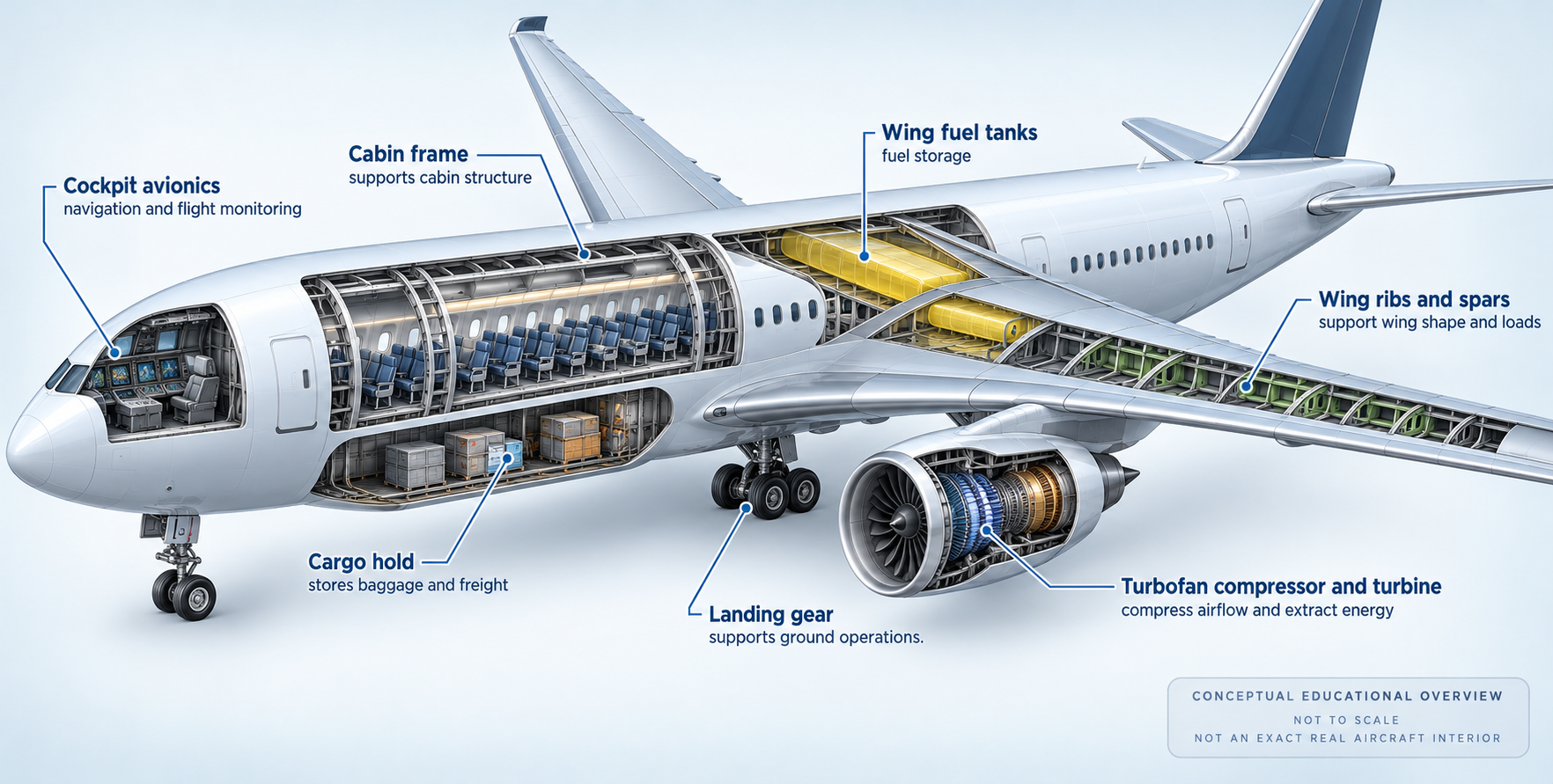
High-Level 3D Cutaway Infographic of a Commercial Airliner
High-Level 3D Cutaway Infographic of a Commercial Airliner — explore this gpt-image-2.5 creation on OpenZhenZhen, with its original prompt and a reusable generation example.
Prompt
Chinese prompt
制作一张整洁、科技感的3D剖面信息图,展示一架无品牌、不可对应具体厂商或型号的现代商用喷气客机。以机身、机翼和尾翼的整体轮廓为主,使用适度的半剖面窗口揭示驾驶舱航电、客舱结构框架、货舱、机翼燃油储存区、机翼翼肋/翼梁、涡扇发动机压气机与涡轮区域、起落架等主要系统的大致位置;少量重点部件可用清晰的分层悬浮示意和细引导线指向对应位置,但保持整体飞机可辨、布局不拥挤。所有英文注释必须逐字采用:Cockpit avionics — navigation and flight monitoring; Cabin frame — supports cabin structure; Cargo hold — stores baggage and freight; Wing fuel tanks — fuel storage; Wing ribs and spars — support wing shape and loads; Turbofan compressor and turbine — compress airflow and extract energy; Landing gear — supports ground operations.。注释只给出结构名称与概括性功能,不添加尺寸、制造公差、材料配方、拆装顺序、维护操作或可用于构建真实飞机的精细参数。背景干净,配色克制,层次分明,兼具教育性与高级工程蓝图的视觉秩序;明确表现为非按比例的概念性教学图,不声称对应某个真实机型的精确内部布局。无品牌、型号标志、人像、乱码、水印或额外文字。
English prompt
Create a clean, technology-forward 3D cutaway infographic of a generic, unbranded modern commercial jet, not identifiable as a particular manufacturer or model. Keep the overall fuselage, wings, and tail recognizable, and use restrained cutaway windows to show approximate zones for cockpit avionics, cabin framing, cargo hold, wing fuel storage, wing ribs/spars, turbofan compressor/turbine sections, and landing gear. A few key parts may be separated slightly with clear leader lines, but keep the aircraft integrated and the layout uncluttered. Use the English annotations exactly as supplied: Cockpit avionics — navigation and flight monitoring; Cabin frame — supports cabin structure; Cargo hold — stores baggage and freight; Wing fuel tanks — fuel storage; Wing ribs and spars — support wing shape and loads; Turbofan compressor and turbine — compress airflow and extract energy; Landing gear — supports ground operations.. Labels should give component names and high-level functions only; include no dimensions, manufacturing tolerances, material recipes, assembly sequence, maintenance procedure, or fine parameters that could serve as a build guide. Use a clean background, restrained palette, clear hierarchy, and polished engineering-infographic order. Mark the diagram as a conceptual educational overview, not to scale, and do not claim it shows an exact real aircraft interior. No brand, model insignia, people, garbled text, watermark, or extra copy.
Explore more AI image and video prompts · Try image generation · Try video generation · Create on the AI canvas
Related works
- Windblown Fashion Editorial
Windblown Fashion Editorial — explore this Moss Image creation on OpenZhenZhen, with its original prompt and a reusable generation example.
- Abstract Light Flame
Abstract Light Flame — explore this Moss Image creation on OpenZhenZhen, with its original prompt and a reusable generation example.
- The World Tree
The World Tree — explore this Moss Image creation on OpenZhenZhen, with its original prompt and a reusable generation example.
- Midnight Supercar Drift
Midnight Supercar Drift — explore this Moss Image creation on OpenZhenZhen, with its original prompt and a reusable generation example.
- Gothic Halloween Stage
Gothic Halloween Stage — explore this Moss Image creation on OpenZhenZhen, with its original prompt and a reusable generation example.
- Tailor Workshop Gentleman
Tailor Workshop Gentleman — explore this Moss Image creation on OpenZhenZhen, with its original prompt and a reusable generation example.