Galerie de prompts IA OpenZhenZhen · gpt-image-2.5 · image
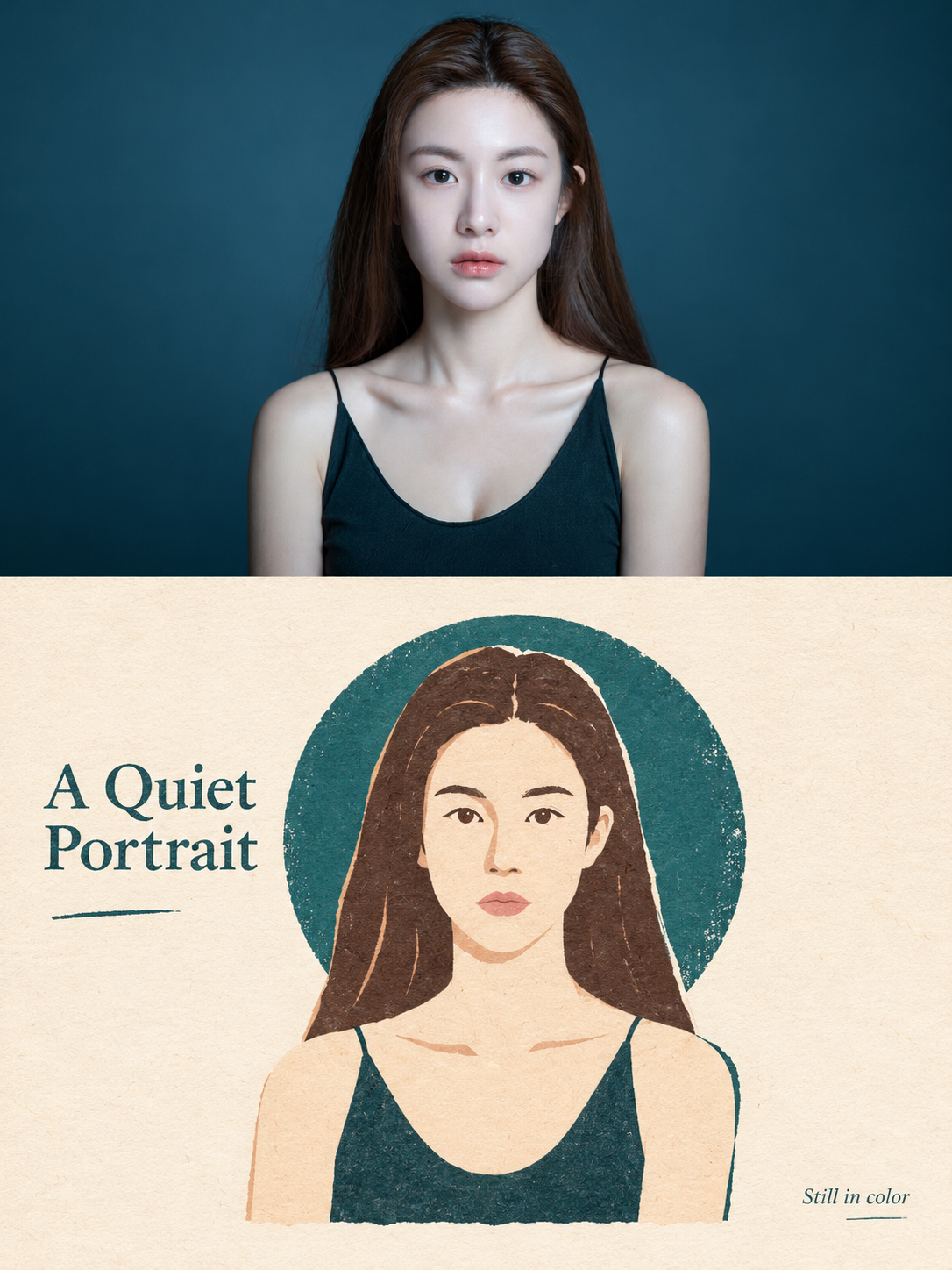
Affiche de sceau portrait en papier découpé, nouvel art populaire
New Folk Art Paper-Cut Portrait Seal Poster
Affiche de sceau portrait en papier découpé, nouvel art populaire — découvrez cette création avec gpt-image-2.5 sur OpenZhenZhen, son prompt original et un exemple de génération à réutiliser.
Prompt
Prompt chinois
每一张照片分别制作成一张独立的高级设计海报,不拼接多图。将完整的ref-10a-v1照片作为唯一整图输入与身份参考。采用3:4竖版构图,上下两个区域高度严格1:1,各占画面50%。实际照片中是一位成年女性,棕色中分长发、黑色细肩带上衣、平静直视目光,背景为深青蓝色。上半部分保留原照片的主体身份、结构、姿态、真实质感、自然光影和色彩氛围,仅做轻微高级编辑调色。为适配区域如有需要,只延展匹配的环境背景;不得拉伸、扭曲或改变人物。下半部分提取同一位成年女性可辨识的轮廓、姿态与安静的人像情绪,重构为扁平新民艺剪纸拼贴。删去无关细节而非完整复制照片,保留足以建立清晰对应关系的视觉记忆点。使用小尺度章印感主视觉和大面积米白纸张留白。根据她的朝向与视觉重心安排位置,可偏心、贴边或局部裁切,但须保持主次清晰和编辑式平衡,周围只放极少辅助形体,不形成多个焦点。表现剪纸拼贴与版画印刷质感:色块边缘略带手工剪切感、轻微套印偏差、掉墨、柔和颗粒、纸张纤维与艺术纸底。背景安静、偏暖白;避免光滑矢量、3D渲染、照片滤镜和过度精修。从实际照片中提取2–4种可辨识颜色,组织成鲜明但克制的扁平色块,并清楚区分主色、辅助色与点睛色。可使用照片中的深青蓝、深色头发/衣着、暖肤色/奶油色及少量自然唇色粉红;保持明快但不刺眼,避免灰脏、沉闷、糖果色或杂乱配色。下半剪纸肖像应能与上方照片一眼对应,并保持同一身份。中文输出时仅加入一个简短、非事实性标题“静谧肖像”,最多再配一条极小说明“静色一瞬”,自然置于留白或边角。不虚构地点、日期、事件、身份或人物经历,不堆叠商业标题。整体呈现新民艺、符号化造型、丝网印刷肌理、大面积留白与高级编辑排版。避免写实插画、复杂透视、过密细节、卡通感、3D感、模板化海报效果和廉价文创感。
Prompt anglais
Turn the complete ref-10a-v1 photograph into one independent high-end design poster, with no multi-photo stitching. Use the complete ref-10a-v1 photo as the sole full-image input and identity reference. Use a 3:4 vertical format, with top and bottom areas strictly 1:1 in height, each occupying 50% of the frame. The actual photo shows one adult woman with long center-parted brown hair, a black thin-strap top, direct calm gaze and a deep teal-blue background. In the upper half, preserve the source photo identity, structure, posture, realistic texture, natural lighting and color atmosphere, with only slight premium editorial color grading. Extend only matching environmental background if needed to fit the panel; never stretch, distort or change the woman. In the lower half, extract the same adult woman’s recognizable outline, pose and quiet portrait mood, then reinterpret her as a flat new folk-art paper-cut collage. Remove irrelevant detail rather than copy the photo in full; retain the key visual memory points that make the correspondence clear. Use a small seal-like main visual with generous off-white paper whitespace. Position it according to her direction and visual center of gravity; it may be offset, edge-aligned or partly cropped, but keep a clear hierarchy and editorial balance, with only a tiny number of supporting forms and no competing focal points. Give the illustration a paper-cut and printmaking texture: slightly hand-cut color-block edges, subtle registration shifts, ink loss, gentle grain, paper fibers and art-paper substrate. Keep the background quiet and warm white; avoid smooth vectors, 3D rendering, photo filters and over-refinement. Extract 2–4 recognizable colors from the actual photo and organize vivid but restrained flat blocks into clear main, supporting and accent roles. Use the photo’s deep teal, dark hair/clothing, warm skin/cream and a small natural lip-pink accent as available colors; keep the result bright but not glaring, and avoid gray/muddy, dull, candy-like or chaotic color. The small paper-cut portrait should remain recognizable from the upper photo and retain its identity. For an English-language render, include one short nonfactual title, “A Quiet Portrait”, and at most one tiny note, “Still in color”, naturally placed in whitespace or a corner. Use no invented location, date, event, identity or biography, and do not stack commercial headlines. Overall evoke new folk art, symbolic shapes, screen-print texture, generous whitespace and premium editorial layout. Avoid realistic illustration, complex perspective, dense detail, cartoonishness, 3D feel, templated poster effects and cheap cultural-souvenir styling.
Découvrir plus de prompts image et vidéo · Générer des images · Générer des vidéos · Créer sur le canevas IA
Œuvres associées
- Ciel d'horlogerie : storyboard d'une aventure steampunk d'une minute
Ciel d'horlogerie : storyboard d'une aventure steampunk d'une minute — découvrez cette création avec gpt-image-2.5 sur OpenZhenZhen, son prompt original et un exemple de génération à réutiliser.
- Affiche publicitaire cyan-vert à portrait et haute densité d'information
Affiche publicitaire cyan-vert à portrait et haute densité d'information — découvrez cette création avec gpt-image-2.5 sur OpenZhenZhen, son prompt original et un exemple de génération à réutiliser.
- Dépliant portrait personnel vert-bleu
Dépliant portrait personnel vert-bleu — découvrez cette création avec gpt-image-2.5 sur OpenZhenZhen, son prompt original et un exemple de génération à réutiliser.
- Terres désolées teal-orange : survivants de la poursuite dans le désert
Terres désolées teal-orange : survivants de la poursuite dans le désert — découvrez cette création avec gpt-image-2.5 sur OpenZhenZhen, son prompt original et un exemple de génération à réutiliser.
- Portrait à la hache en imperméable translucide dans un intérieur minimaliste gris froid
Portrait à la hache en imperméable translucide dans un intérieur minimaliste gris froid — découvrez cette création avec gpt-image-2.5 sur OpenZhenZhen, son prompt original et un exemple de génération à réutiliser.
- Six portraits d'identité en studio sur fond beige clair
Six portraits d'identité en studio sur fond beige clair — découvrez cette création avec gpt-image-2.5 sur OpenZhenZhen, son prompt original et un exemple de génération à réutiliser.