Galerie de prompts IA OpenZhenZhen · gpt-image-2.5 · image
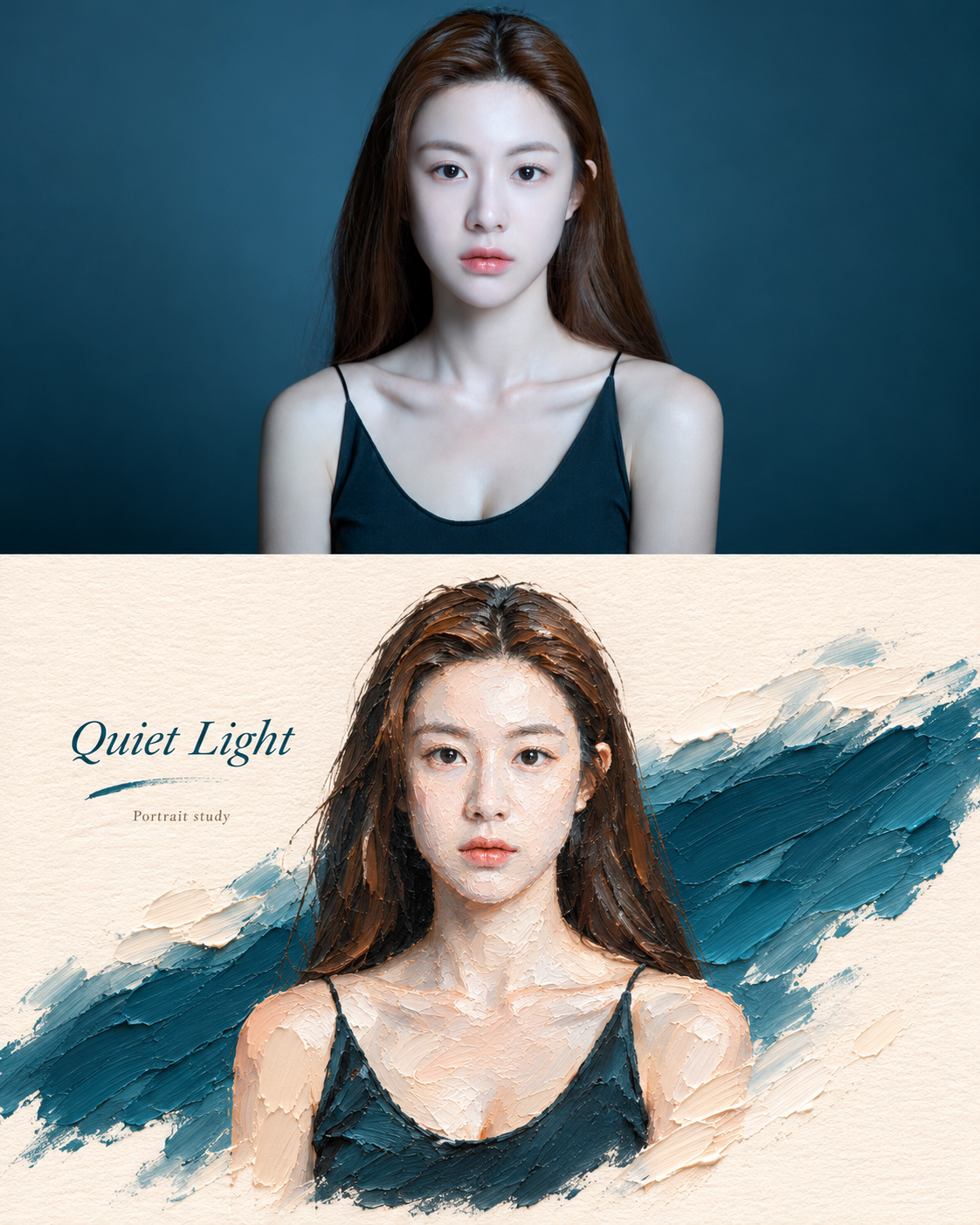
Affiche divisée : portrait réaliste et micro-paysage à l'empâtement
Realistic Portrait and Impasto Miniature Landscape Split Poster
Affiche divisée : portrait réaliste et micro-paysage à l'empâtement — découvrez cette création avec gpt-image-2.5 sur OpenZhenZhen, son prompt original et un exemple de génération à réutiliser.
Prompt
Prompt chinois
创作一张竖版上下双拼海报,整张画布纵向排列,上半部分与下半部分高度精准1:1,形成清晰的“原始照片 × 风格转译”关系。将完整的ref-10a-v1照片作为唯一整图输入与身份参考。来源只规定竖版方向与上下等高,没有规定确切画幅比例;现有4:5输出设置仅作兼容默认值。实际完整照片中是一位成年女性,棕色中分长发、黑色细肩带上衣、平静直视目光,背景为深青蓝色。上半部分完整直接展示原始照片,保留真实照片质感、原有取景与拍摄氛围、自然光线,以及女性的身份、可辨识五官、发型、衣着、肩部、姿态和表情。照片中不替换、风格化或增加主体。下半部分把同一位成年女性、可辨识的面部与肩部轮廓、平静直视的情绪转译为三维厚涂油画风格的微景观。不要机械复制照片;以厚涂笔触、颜料堆叠和雕塑般体积感重新塑造,同时保持主体核心身份与关键特征可辨。可将人像适度转化为触感鲜明的微缩实体;人物仍是唯一主体,不以建筑、家具或虚构场景为主。构图采用居中或略微偏心的斜向主轴,在明亮暖白纹理纸面上保留大面积留白。以一抹由原图主题推导的清透厚涂色带承托人物,使用实际背景中的深青蓝;色带可成为抽象地面、路径或光带,并通过克制的倒影、波纹、光斑或延展笔触与人像自然交互。只有当少量厚涂云雾或抽象自然记号确实烘托人像情绪时才加入;不要形成独立第二主体。呈现颜料堆积、刮刀痕迹、起伏边缘、纸张纹理与半手工塑形感;厚涂集中于色带与局部高光,使微景观具有体积和真实油彩质感。提取照片中实际出现的最明亮鲜活颜色,不做平均取色:提纯青蓝、暖肤色/奶油色、深棕或黑色头发与衣着,以及少量自然唇色粉红。提升明度与纯净度,但不添加照片没有依据的颜色;色彩清晰而不刺眼,并保留充足暖白留白。避免灰脏、莫兰迪化、暗褐滤镜、荧光色和廉价糖果感。中文输出时使用一个由照片情绪提炼的短标题“静光”,最多再配一条极小说明“人像习作”。将其作为艺术出版物式小标注,克制地沿斜向主轴、人物边缘或留白排布。不虚构地点、日期、事件、身份或人物经历;不加Logo、水印或解释性长文。上下两幅须一眼看出是同一主体的原始照片与厚涂重构。不要让建筑成为主角,不要生成无关第二主体,不要破坏上下风格关联;避免卡通玩具感、塑料电脑渲染、电商感和模板化效果。
Prompt anglais
Create a vertical split-style poster. The entire canvas is arranged vertically, with top half and bottom half heights accurately at 1:1, forming a clear original-photo-to-style-translation pair. Use the complete ref-10a-v1 photograph as the sole full-image input and identity reference. The source specifies a vertical orientation and equal-height panels, not an exact aspect ratio; use the existing 4:5 output setting only as a compatibility default. The actual complete photo shows one adult woman with long center-parted brown hair, a black thin-strap top, direct calm gaze and a deep teal-blue background. In the top half, show the complete original photograph directly, retaining its real photo texture, original framing and atmosphere, natural lighting, the woman's identity, recognizable face, hair, clothing, shoulders, posture and expression. Do not stylize, replace or add subjects in the photo. The lower half translates the same adult woman, recognizable face-and-shoulder outline and calm direct-gaze mood into a three-dimensional impasto oil-painting style micro-landscape. Do not mechanically copy the photograph: use thick brushstrokes, layered pigment and sculptural volume while keeping her core identity and key features recognizable. Modestly adapt the portrait into a small tactile miniature; the person remains the sole subject, not architecture, furniture or an invented setting. Compose a centered or slightly off-center diagonal axis with generous negative space on bright warm-white textured paper. Support the woman with a clear impasto color band derived from the source theme, using the deep teal-blue in the actual background; it may become an abstract ground, path or light band, and interact naturally with the portrait through restrained reflections, ripples, light spots or extended brushstrokes. Add only minimal impasto clouds, mist or abstract natural marks when they support the portrait mood; no independent second subject. Show accumulated paint, palette-knife marks, undulating edges, paper texture and a semi-hand-shaped feel. Concentrate thick impasto on the color band and local highlights so the miniature feels dimensional and materially like real oil paint. Extract the brightest, most vivid colors actually present in the photo, not average color sampling: clarify the teal, warm skin/cream, deep brown/black hair and clothing and small natural lip-pink accent. Raise brightness and purity without inventing colors unsupported by the photo; keep hues distinct but not dazzling, with abundant warm-white breathing space. Avoid dull gray or Morandi-fication, dark-brown filters, fluorescent colors and cheap candy color. For an English-language render, use one short mood-derived title, “Quiet Light”, and at most one tiny note, “Portrait study”. Place them discreetly along the diagonal axis, near the portrait or in whitespace like refined art-publication annotations. Do not invent location, date, event, identity or biography, and omit logos, watermarks and long explanatory text. Make the upper photograph and lower painted portrait immediately recognizable as the same subject. Avoid architecture as protagonist, unrelated second subjects, a broken top/bottom style relationship, cartoon-toy or plastic-render looks, e-commerce style and templated effects.
Découvrir plus de prompts image et vidéo · Générer des images · Générer des vidéos · Créer sur le canevas IA
Œuvres associées
- Peinture folklorique coréenne réinterprétée, composition originale
Peinture folklorique coréenne réinterprétée, composition originale — découvrez cette création avec gpt-image-2.5 sur OpenZhenZhen, son prompt original et un exemple de génération à réutiliser.
- Portrait cyan-vert en une de journal vintage
Portrait cyan-vert en une de journal vintage — découvrez cette création avec gpt-image-2.5 sur OpenZhenZhen, son prompt original et un exemple de génération à réutiliser.
- Conversion de portrait photo sur fond bleu-vert
Conversion de portrait photo sur fond bleu-vert — découvrez cette création avec gpt-image-2.5 sur OpenZhenZhen, son prompt original et un exemple de génération à réutiliser.
- Ciel d'horlogerie : storyboard d'une aventure steampunk d'une minute
Ciel d'horlogerie : storyboard d'une aventure steampunk d'une minute — découvrez cette création avec gpt-image-2.5 sur OpenZhenZhen, son prompt original et un exemple de génération à réutiliser.
- Affiche publicitaire cyan-vert à portrait et haute densité d'information
Affiche publicitaire cyan-vert à portrait et haute densité d'information — découvrez cette création avec gpt-image-2.5 sur OpenZhenZhen, son prompt original et un exemple de génération à réutiliser.
- Dépliant portrait personnel vert-bleu
Dépliant portrait personnel vert-bleu — découvrez cette création avec gpt-image-2.5 sur OpenZhenZhen, son prompt original et un exemple de génération à réutiliser.