Galerie de prompts IA OpenZhenZhen · gpt-image-2.5 · image
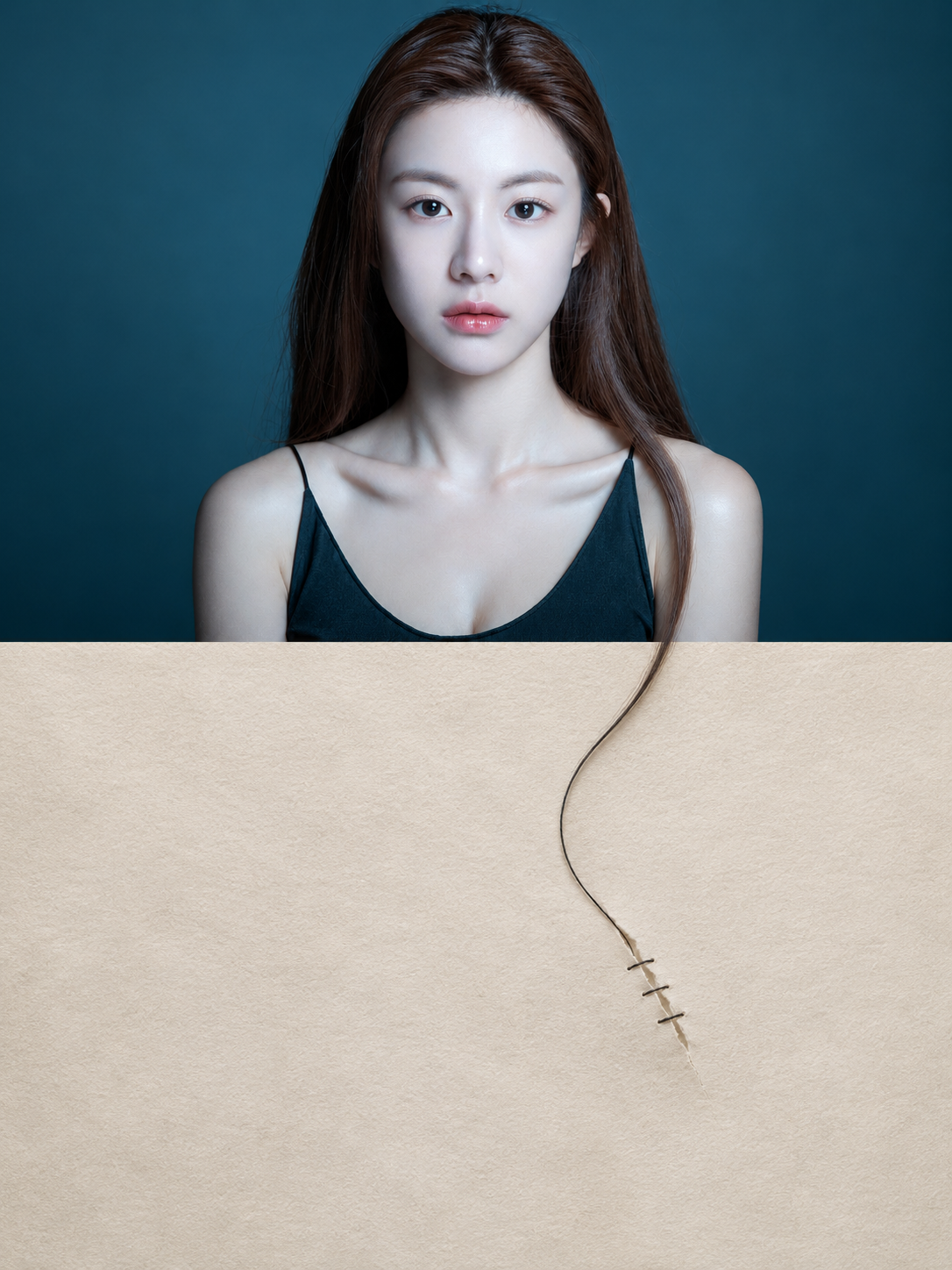
Affiche de photographie conceptuelle de traduction transfrontalière du Second Monde
Second World Boundary-Crossing Translation Concept Photography Poster
Affiche de photographie conceptuelle de traduction transfrontalière du Second Monde — découvrez cette création avec gpt-image-2.5 sur OpenZhenZhen, son prompt original et un exemple de génération à réutiliser.
Prompt
Prompt chinois
将完整的ref-10a-v1照片作为唯一图像输入与身份参考,创作一张独立的3:4竖版“第二世界”概念性超现实摄影插画海报。每张照片独立输出,不拼接多张照片。画布上、下两部分高度严格1:1。上半部分保留原始真实照片:同一位成年女性、她的身份、平静直视的神情、头肩姿势、棕色中分长发、黑色细肩带上衣、空间关系、深青蓝色彩、光线与摄影质感均须保留。仅为适配3:2上方面板而做必要的等比水平侧裁;不得扭曲、重摆或风格化照片。上下不是简单拼接,而是同一瞬间在两个叙事层中的连续存在。 观察这张人像中真实可见的长发轮廓与照片下边界。选取一缕自然延伸至下边缘的可见发丝,让这条真实轮廓突破照片边界进入下半部分,并转化为一根纤细的黑色缝线。在第二空间里,这根线轻轻缝合它进入纸面处的一道小裂口,使真实发丝转变为修补工具。让越界、材质变化与修补共同构成聪明而安静的跨层隐喻;不能只是延长、贴上装饰或加入无关场景。上方照片的其他特征均忠实保留。 下半部分采用安静温暖、带细微肌理的暖米白纸面,并保留充足留白。它不是装饰性插画背景,而是承接越界后新逻辑的空间。叙事顺序须清楚呈现“现实→越界→转译”。整体采用精致的混合媒介摄影插画、超现实拼贴、越框错觉、错视、视觉隐喻与概念编辑插画风格,情绪温柔、轻微且克制。本实例将针脚和裂口处理得小巧、准确、自然融合;不加线稿使用者,也不加手写旁白。不要添加额外主体或无关道具。 不要做成照片下方加小人和句子的模板;不要只有延伸没有转译,也不要只有形式没有隐喻。避免强行抒情、商业广告感、复杂插画感、重复动作、无依据装饰、机械拼贴、硬连接或廉价治愈风。最终画面首先必须像一张成立的真实照片,再让观者发现真实发丝越界进入第二空间,并自然获得修补线的全新意义。揭示照片中潜伏的第二种现实,而不是简单给照片加创意。
Prompt anglais
Using the complete ref-10a-v1 photograph as the sole image input and identity reference, create one independent 3:4 vertical Second World conceptual surrealist photo-illustration poster. Output this photo independently, with no collage of multiple photos. Divide the canvas into upper and lower halves of exactly equal height, 1:1. The upper half remains the original realistic photograph: preserve the same adult woman, her identity, direct calm gaze, head-and-shoulders pose, long center-parted brown hair, black thin-strap top, spatial relationships, deep teal color, lighting and photographic texture. Make only the necessary proportional horizontal side crop to fit the 3:2 upper panel; do not distort, restage or stylize the photo. The top and bottom are not a simple splice but the same moment continuing through two narrative layers. Study the actual portrait's long hair contours and the lower photo boundary. Select one visible lock of hair that naturally reaches the lower edge; let that exact contour cross the photo boundary into the lower half and transform into a fine black sewing thread. In the second space, the thread gently stitches a small tear exactly where it enters the paper, turning a real strand into a tool for repair. Make the crossing, material change and repair legible as one clever, quiet cross-layer metaphor—not a mere extension, pasted decoration or unrelated scene. Preserve every other upper-photo feature faithfully. Make the lower half a quiet warm off-white paper space with fine texture and ample whitespace. It is not a decorative illustration background: it carries the new logic after crossing. The sequence must read Reality → Crossing → Translation. Use refined mixed-media photo illustration, surreal photomontage, frame-breaking illusion, trompe-l’œil, visual metaphor and conceptual editorial illustration, with gentle, slight micro-surrealism. Keep the stitch and tear small, precise and naturally integrated; add zero line-art users and no handwritten narration in this instance. Do not add any extra subjects or unrelated props. Do not make a template of small people and sentences below a photo; do not use extension without translation or form without metaphor. Avoid forced lyricism, commercial advertising tone, complex illustration, repeated actions, baseless decoration, mechanical collage, hard connections and cheap healing style. The final image must first read as a valid real photograph, then reveal the actual hair contour crossing into a second layer and gaining the natural new meaning of a repair thread. Reveal a second reality latent in the photograph rather than simply adding creativity to it.
Découvrir plus de prompts image et vidéo · Générer des images · Générer des vidéos · Créer sur le canevas IA
Œuvres associées
- Affiche publicitaire cyan-vert à portrait et haute densité d'information
Affiche publicitaire cyan-vert à portrait et haute densité d'information — découvrez cette création avec gpt-image-2.5 sur OpenZhenZhen, son prompt original et un exemple de génération à réutiliser.
- Dépliant portrait personnel vert-bleu
Dépliant portrait personnel vert-bleu — découvrez cette création avec gpt-image-2.5 sur OpenZhenZhen, son prompt original et un exemple de génération à réutiliser.
- Terres désolées teal-orange : survivants de la poursuite dans le désert
Terres désolées teal-orange : survivants de la poursuite dans le désert — découvrez cette création avec gpt-image-2.5 sur OpenZhenZhen, son prompt original et un exemple de génération à réutiliser.
- Portrait à la hache en imperméable translucide dans un intérieur minimaliste gris froid
Portrait à la hache en imperméable translucide dans un intérieur minimaliste gris froid — découvrez cette création avec gpt-image-2.5 sur OpenZhenZhen, son prompt original et un exemple de génération à réutiliser.
- Six portraits d'identité en studio sur fond beige clair
Six portraits d'identité en studio sur fond beige clair — découvrez cette création avec gpt-image-2.5 sur OpenZhenZhen, son prompt original et un exemple de génération à réutiliser.
- Avatar blond tacheté de rousseur style Pixar
Avatar blond tacheté de rousseur style Pixar — découvrez cette création avec gpt-image-2.5 sur OpenZhenZhen, son prompt original et un exemple de génération à réutiliser.