Galerie de prompts IA OpenZhenZhen · gpt-image-2.5 · image
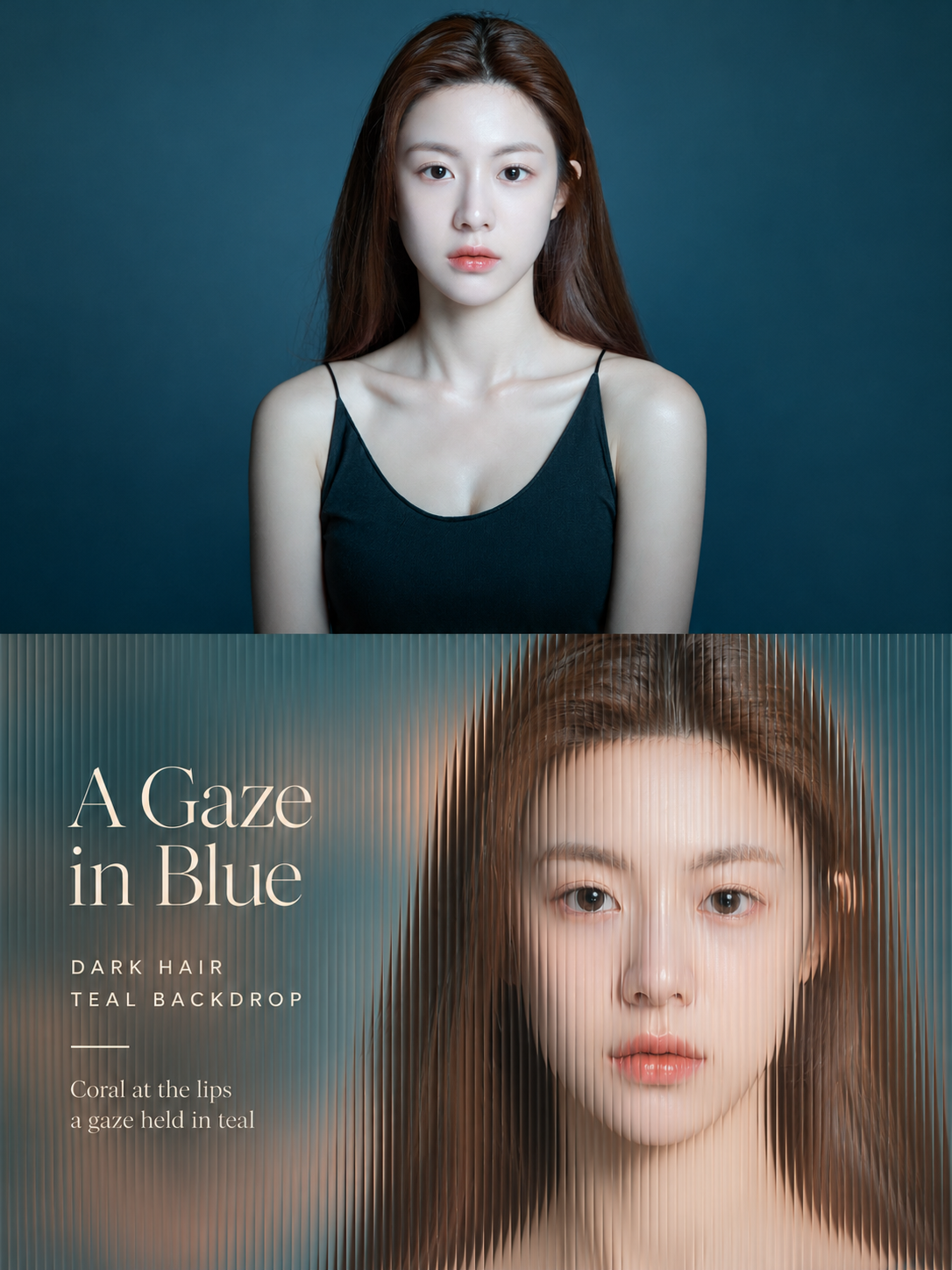
Affiche portrait à travers un verre strié
Prismatic Glass Portrait Poster
Affiche portrait à travers un verre strié — découvrez cette création avec gpt-image-2.5 sur OpenZhenZhen, son prompt original et un exemple de génération à réutiliser.
Prompt
Prompt chinois
本次将已提供的 ref-10a-v1 整幅 JPG 作为实际原始照片和唯一视觉来源。为这张照片单独制作一张编辑海报,不得拼接上传图。照片中是一位成年女性,留有深棕色长发、深色眼睛和珊瑚色嘴唇,穿黑色细肩带上衣,背景为深青蓝色。 画幅与上半部 采用竖幅 3:4 画布,上下两部分高度严格相等,各占 50%。水平中线只是概念折痕,不可见。上半部保留完整原照片,包括女性的身份、姿势、结构、真实纹理、自然光线、色彩氛围和头顶留白;仅允许轻微编辑式调色,必要时自然延展周围背景。不要裁掉关键特征,不得拉伸、扭曲或改动女性主体。上半部不加文字。 下半部——满版长虹玻璃 只将同一位女性可辨识的面部、发型轮廓、姿态和表情重新诠释为摄影特写;不要虚构更多身体或场景。放大面部并置于右侧,留出头顶空间,主体不触及中线折痕。背景简化为少量大片柔焦色彩。用极细密、窄而连续的垂直长虹玻璃棱纹从边到边覆盖整个下半部,不留任何平坦区域。相邻图像切片轻微挤压并错位,使面部和发丝轮廓呈现细致的垂直阶梯;每条棱边带一线纤细亮光。女性身份必须清晰可辨。不要玻璃边框或独立反射,只呈现均匀棱纹和轻微折射。不要宽疏竖带、运动拖影或简单叠加条纹。 左侧编辑文案 左侧留一块柔焦色彩区域,保证文字清晰,同时细密玻璃棱纹仍须贯穿全幅。所有文案避开面部、关键特征和不可见的中线折痕。用纤细衬线体准确呈现两行标题“蓝中 / 凝望”。标题下用两行字距舒展的小型无衬线中文:“深棕长发”与“青蓝背景”。加一条短细线。细线下方用两行安静、贴合照片的小字:“唇边一线珊瑚色”与“凝眸停驻青蓝间”。不要添加其他文案、刊号、水印或无关图形。 光线与色彩 保留源图中女性的本色,并从照片提取温暖明亮的色调。采用透过玻璃的柔和暖光、清晰但温和的阴影、垂直棱纹上的细亮边,以及文案后方少量源图色彩的柔焦。提亮阴影,避免灰暗、沉重黑影或刺眼饱和。整体保持精致摄影质感和贴合此刻的安静编辑氛围。避免平面叠加、宽条纹、杂乱、虚构事实背景、通用口号、说教和模板化风格。
Prompt anglais
Use the entire supplied ref-10a-v1 JPG as the actual original photo and sole visual source. Create one separate editorial poster for this photo; never combine uploads. The photo shows one adult woman with long dark-brown hair, dark eyes, coral lips, and a black thin-strap top against deep teal-blue. FORMAT AND UPPER HALF Make a vertical 3:4 canvas with two equal stacked halves, exactly 50% each. The horizontal fold is conceptual and invisible. Preserve the full original photo in the upper half, including the woman's identity, pose, structure, realistic texture, natural light, color mood, and headroom; allow only a light editorial grade and natural extension of surrounding background if needed. Do not crop key features, stretch, distort, or alter her. No text above. LOWER HALF — FULL-BLEED FLUTED GLASS Create a close photographic reinterpretation of only this same woman's recognizable face, hair silhouette, pose, and expression; do not invent additional body or scene. Enlarge her face and place it on the right, with clear headroom and nothing touching the center fold. Simplify the background into a few broad, softly blurred colors. Cover the entire lower half edge-to-edge with extremely fine, dense, narrow, continuous vertical fluted-glass ribs; leave no flat patches. Slightly squeeze and offset every adjacent image slice so facial and hair contours form delicate vertical steps. Give each rib a thin bright edge. Keep her identity clearly recognizable. Show no glass frame or separate reflection—only the regular ribs and subtle refraction. No wide bands, motion trails, or simple stripe overlay. EDITORIAL COPY AT LEFT Reserve a softly blurred color patch on the left for legible text, while the fine glass ribs remain visible across the full width. Keep all copy clear of the face, key features, and invisible center fold. Set the exact two-line fine-serif headline “A Gaze / in Blue”. Beneath it, use two widely tracked small uppercase sans-serif lines: “DARK HAIR” and “TEAL BACKDROP”. Add one short fine rule. Below the rule, set these two small, quiet, photo-specific lines: “Coral at the lips” and “a gaze held in teal”. Add no other copy, issue number, watermark, or unrelated graphic. LIGHT AND COLOR Preserve the source woman's colors and derive warm luminous tones from the photo. Use soft warm light through the glass, clear but gentle shadows, fine highlights on the vertical ribs, and a few blurred source-derived colors behind the text. Lift shadows without dull grayness, heavy blackness, or harsh saturation. Keep a refined photographic finish and a quiet, moment-specific editorial mood. Avoid a flat overlay, broad stripes, clutter, fabricated factual background, generic slogans, moralizing, and template styling.
Découvrir plus de prompts image et vidéo · Générer des images · Générer des vidéos · Créer sur le canevas IA
Œuvres associées
- Affiche en relief mural : portrait et tissu débordant
Affiche en relief mural : portrait et tissu débordant — découvrez cette création avec gpt-image-2.5 sur OpenZhenZhen, son prompt original et un exemple de génération à réutiliser.
- Portraits primitifs et collage de matériaux naturels, illustration éditoriale
Portraits primitifs et collage de matériaux naturels, illustration éditoriale — découvrez cette création avec gpt-image-2.5 sur OpenZhenZhen, son prompt original et un exemple de génération à réutiliser.
- Affiche contrastée entre portrait réaliste et abstraction géométrique
Affiche contrastée entre portrait réaliste et abstraction géométrique — découvrez cette création avec gpt-image-2.5 sur OpenZhenZhen, son prompt original et un exemple de génération à réutiliser.
- Portraits primitifs et affiches miniatures en papiercraft d'un second monde
Portraits primitifs et affiches miniatures en papiercraft d'un second monde — découvrez cette création avec gpt-image-2.5 sur OpenZhenZhen, son prompt original et un exemple de génération à réutiliser.
- Affiche diptyque de portrait à la lumière de l'après-midi
Affiche diptyque de portrait à la lumière de l'après-midi — découvrez cette création avec gpt-image-2.5 sur OpenZhenZhen, son prompt original et un exemple de génération à réutiliser.
- Affiche éditoriale de magazine indépendant rétro
Affiche éditoriale de magazine indépendant rétro — découvrez cette création avec gpt-image-2.5 sur OpenZhenZhen, son prompt original et un exemple de génération à réutiliser.