Galerie de prompts IA OpenZhenZhen · gpt-image-2.5 · image
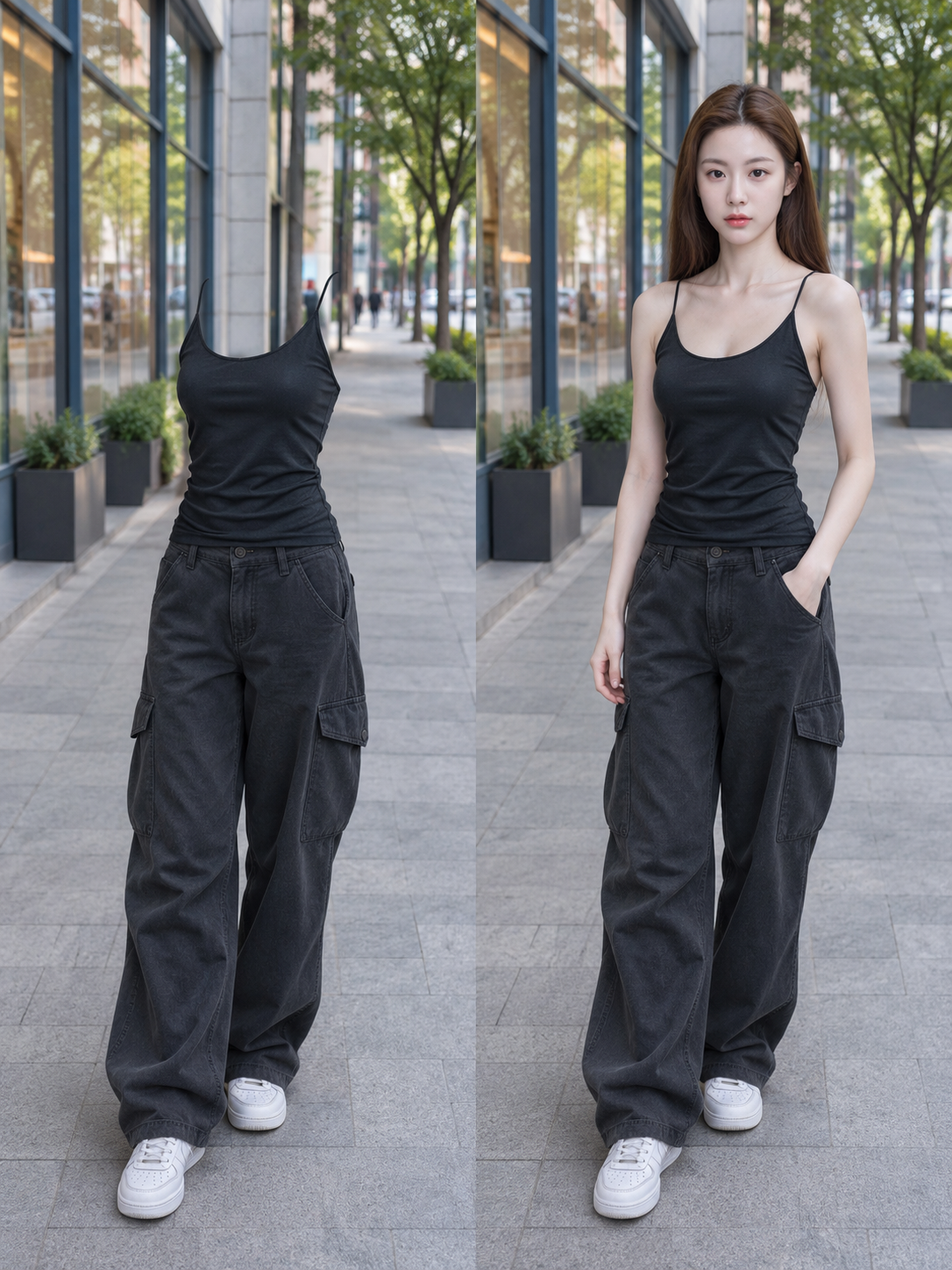
Portraits comparés du même personnage, invisible et visible
Side-by-Side Invisible and Visible Portraits of the Same Person
Portraits comparés du même personnage, invisible et visible — découvrez cette création avec gpt-image-2.5 sur OpenZhenZhen, son prompt original et un exemple de génération à réutiliser.
Prompt
Prompt chinois
制作同一位成年人物“隐身/显身”的左右对照照片。可选输入:用户上传的原始照片 source_photo。若提供,显身侧以它为原片,保留身份、面貌、发型、身形、姿势、服装、鞋饰、机位、背景和光线,不重设计人物或换装;两侧沿用原取景,半身/局部图不得擅自补造未出现的身体、衣物或鞋子。用户要求修改时,先完成修改后的显身原图,再由它制作隐身版。若未提供照片,先生成一张显身原图,再由同一底图制作隐身版。默认人物为20岁成年亚洲女性,纤细小巧、自然面貌、轻松俏皮;穿适合亚洲城市日常的协调真实上装、下装和鞋,清楚呈现材质、轮廓、缝线与褶皱,上衣主体面料或内衬不透肤;正面朝镜头、身体微转约15度、一腿承重、另一脚自然向前,一手插袋、另一手自然下垂。用户指定优先。无照片的默认预览使用 ref-10a-v1 仅锚定这位默认女性的面部;若用户上传照片中的人物不同,忽略固定面部参考,以用户原片为准。 无原片时的默认场景:超写实亚洲商业街,含店面橱窗、树木、地砖及适量远景城市细节;iPhone 26mm 主镜头、1倍视角、自然 HDR、柔和午后光、轻微手机噪点,合理比例与真实材质、适度背景虚化。全身构图,头顶留白、鞋子完整、脚下留出人行道。有原片时遵循其构图和摄影特征。 流程:(1)确定最终显身原图;(2)复制原图,仅移除副本中的人体;(3)将隐身版置左、对应显身原图置右,各占纵向 9:16 成图的一半。两侧必须来自同一底图,取景、机位、比例、位置一致,背景完整且相互对应、重复出现,中间直接拼接,不加宽分隔条。仅为适配版式可适度扩展背景;不拉伸人物、不改比例、不裁掉需保留的衣鞋、不把两个人放进同一连续街景。 隐身侧:头、脸、头发、颈、躯干、双臂、双手、所有手指、双腿和双脚须100%不可见。按遮挡关系补全所有暴露区域,背景连续自然、透视正确,并符合建筑结构、地砖走向、景深、光线与纹理;若头发/手臂遮住衣物,补全对应面料、缝线和褶皱,不用平涂色块。不得出现玻璃或半透明人体、轮廓、折射、发光、人形遮罩、白洞或黑洞。 全部衣物、鞋和配饰须按原位、大小、角度、款式、颜色、材质与穿着状态保留。上衣保留肩线、袖型、领口、衣摆及胸腰张力褶皱,衣物自然撑起,不塌、不移、不摊平、不脱下;领口、袖口和开口处不得残留皮肤、头发、颈臂截面或假人填充,尤其清除肤色颈圈。下装保留腰臀、裤腿/裙摆、缝线、褶皱、垂坠和口袋受力形变,同时去除手臂与手指。鞋子保留落地位置、朝向、大小、鞋带、鞋舌、鞋面及真实接触阴影;鞋口内外不得出现脚、踝、小腿或身体截面。配饰原样留位,不增添。蕾丝/网眼保留纤维和孔隙;原本透出皮肤处按实际遮挡显示背景或原有内层,不得改款、擅加内衬或填实网眼。不要衣架、假人或支架。 光影:两侧曝光、色温、光向和阴影软硬一致。保留衣物/鞋饰合理投影,移除人体及头发投下的阴影(含背景或衣物上的对应阴影),不留完整人形影。 交付前检查左侧无人体、头发或肤色残留,重点查看领口、袖口、口袋、下装开口和鞋口;核对两侧衣鞋饰、姿态、比例和位置对应,背景补全连续,鞋子落地,衣物穿着自然;确保最终为左隐身、右显身拼接图。负面:隐身侧人体/皮肤/脸/头发/颈部残留、肉色填充、手指/四肢/脚/截面、轮廓/半透明/折射/发光/人形影、空洞、背景断裂、衣物补错/改款/漂移/褶皱不一致、鞋款改变或悬空、衣服塌落、支架/假人、多余衣物/人物/肢体、姿势不一致、比例失真、文字/标签/水印/边框、插画/卡通/CGI/塑料质感。
Prompt anglais
Create a side-by-side “invisible / visible” photo comparison of the same adult character. Optional input: a user-uploaded source_photo. If present, use it as the visible original and preserve its subject identity, face, hair, body shape, pose, clothing, shoes, accessories, camera angle, background and lighting. Do not redesign or change the outfit. Keep its original crop on both sides; for partial photos, do not invent missing body parts, clothes or shoes. If the user requests changes, first make the requested visible original, then derive the invisible version from it. If no photo is supplied, first create one original visible image, then derive the other side from that exact image. Default: a 20-year-old adult Asian woman, slender petite build, natural features, relaxed playful expression; coordinated realistic Asian-city daily outfit with top, bottom and shoes, clear materials, silhouette, seams and folds, opaque top fabric or lining; facing camera, body turned about 15 degrees, weight on one leg, other foot naturally forward, one hand in a pocket, other relaxed. User specifications override defaults. For this no-photo preview, use configured ref-10a-v1 only as the default woman’s facial identity; if an uploaded photo depicts someone else, disregard the fixed face reference and preserve the uploaded person. Default scene when no source photo: photorealistic Asian commercial street with storefront windows, trees, tiled pavement and modest distant city detail; iPhone 26 mm main lens, 1× view, natural HDR, soft afternoon light, slight phone noise, realistic proportions/materials and moderate background bokeh. Use full body with headroom, shoes fully visible and sidewalk below feet. With a source photo, follow its own framing and photographic character. Workflow: (1) settle the final visible original; (2) duplicate it and remove only the human body from the duplicate; (3) stitch invisible left and corresponding visible original right, each half of a vertical 9:16 final. Both halves must derive from the same base image, with matching crop, camera, scale, placement and complete corresponding repeated backgrounds. A central direct seam; no wide divider. Extend background only as needed. Do not stretch the person, alter proportions, crop retained clothes/shoes, or place two people in one continuous street scene. Invisible side: make head, face, hair, neck, torso, arms, hands, every finger, legs and feet 100% invisible. Reconstruct all exposed occlusions as continuous, natural, perspective-correct background consistent with architecture, tile direction, depth, light and texture. Where hair/arms cover clothing, reconstruct the correct fabric, seams and folds according to occlusion; do not use flat color patches. No glass/translucent body, outline, refraction, glow, human mask or white/black hole. Retain every garment, shoe and accessory in original position, size, angle, style, color, material and worn state. Preserve top shoulder/sleeve/neckline/hem shapes, chest/waist tension and folds; garments stay naturally supported, not collapsed, shifted, flattened or removed. Remove all residual skin, hair, neck/arm cross-sections and mannequin-like fillers at neckline, cuffs and openings, including skin-colored rings. Preserve bottoms’ waist/hip, leg or skirt hems, seams, folds/drape and pocket deformation, while removing hands/arms. Preserve shoe placement, orientation, size, laces, tongue and upper, realistic ground contact/shadows, with no feet/ankles/calves/body cross-sections at openings. Keep existing accessories in place; add none. Preserve lace/mesh fibers and pores; where pores revealed skin, show background or original lining according to actual occlusion. Never redesign fabric, invent lining or plug open weave. No hangers, mannequins or supports. Lighting: match exposure, color temperature, light direction and shadow softness. Keep reasonable shadows from retained clothing/shoes/accessories; remove body- and hair-cast shadows, including on background and clothes; no human-shaped shadow. Before delivery, check left for any body/hair/skin residue, especially necklines, cuffs, pockets, openings and shoes; verify both sides’ clothes, shoes, accessories, pose, scale and placement correspond; background repairs are continuous; footwear grounded; clothes naturally worn; final is invisible-left/visible-right split. Negative: visible body/skin/face/hair/neck residue, flesh fills, fingers/limbs/feet/cross-sections, outlines/translucency/refraction/glow/shadows, holes, broken background, bad clothing repair/change/drift, inconsistent folds, changed/floating shoes, collapsed clothes, supports/mannequins, extra clothes/people/limbs, mismatched poses, distorted proportions, text/labels/watermarks/borders, illustration/cartoon/CGI/plastic.
Découvrir plus de prompts image et vidéo · Générer des images · Générer des vidéos · Créer sur le canevas IA
Œuvres associées
- Portrait souriant tenant une canette Fanta orange
Portrait souriant tenant une canette Fanta orange — découvrez cette création avec gpt-image-2.5 sur OpenZhenZhen, son prompt original et un exemple de génération à réutiliser.
- Texture de retouche portrait réaliste et haut de gamme en lumière douce
Texture de retouche portrait réaliste et haut de gamme en lumière douce — découvrez cette création avec gpt-image-2.5 sur OpenZhenZhen, son prompt original et un exemple de génération à réutiliser.
- Moine guerrier tengu
Moine guerrier tengu — découvrez cette création avec Moss Image sur OpenZhenZhen, son prompt original et un exemple de génération à réutiliser.
- Portrait professionnel en buste à la lumière douce coréenne
Portrait professionnel en buste à la lumière douce coréenne — découvrez cette création avec gpt-image-2.5 sur OpenZhenZhen, son prompt original et un exemple de génération à réutiliser.
- Mineur chat licorne
Mineur chat licorne — découvrez cette création avec Moss Image sur OpenZhenZhen, son prompt original et un exemple de génération à réutiliser.
- Autoportrait miroir en veste crème
Autoportrait miroir en veste crème — découvrez cette création avec gpt-image-2.5 sur OpenZhenZhen, son prompt original et un exemple de génération à réutiliser.