OpenZhenZhen AI 프롬프트 갤러리 · gpt-image-2.5 · image
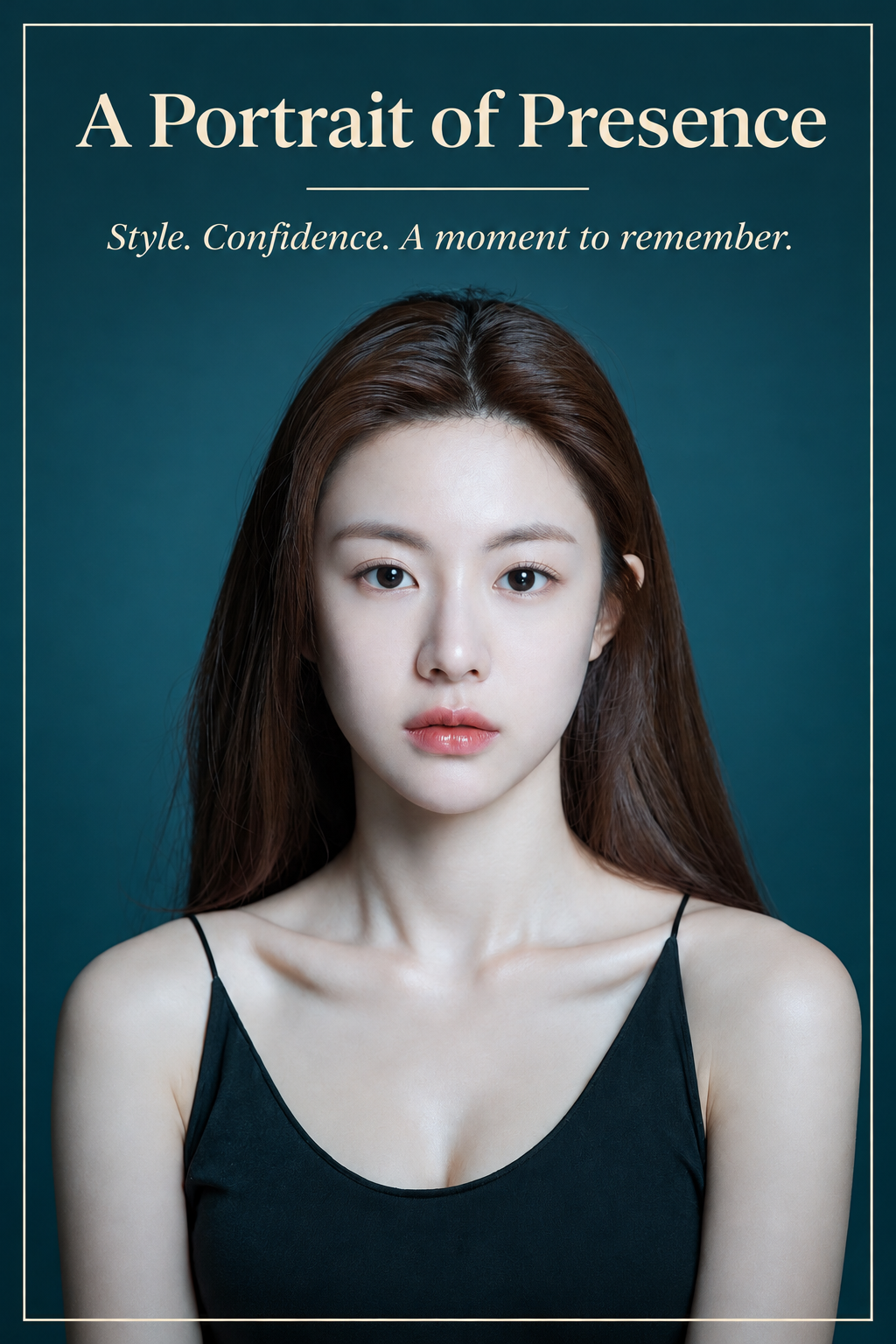
청록색 인물 초상 개인 이미지 전단지
Cyan-Green Portrait Personal Image Flyer
‘청록색 인물 초상 개인 이미지 전단지’은(는) gpt-image-2.5로 만든 작품입니다. OpenZhenZhen에서 원본 프롬프트와 생성 예시를 살펴보고 새로운 창작에 활용해 보세요.
프롬프트
중국어 프롬프트
将已配置的 identity_reference ref-10a-v1 作为提供的个人资料照片和宣传单主视觉,设计一张精致的个人形象宣传单。保留照片中同一成年女性可辨识的面容、自然表情、肤色、顺直长发、黑色细肩带上衣及青绿色背景;保持肖像可辨认,不虚构或替换人物身份。围绕照片构建简洁高级的竖版编辑式版面,留白充足、对齐利落、字体层级清晰易读,并使用精致细分隔线;从照片提取克制的青绿色、深炭灰和暖象牙白配色。让原始肖像主导页面,仅用轻微边框和图形点缀,确保照片仍是视觉焦点。以清晰、高对比、拼写准确的字排出唯一主标题 “A Portrait of Presence” 和唯一辅助句 “Style. Confidence. A moment to remember.”。不要添加姓名、账号名、个人简介、职业、公司、服务、联系方式、资历或事实性宣传主张;不要出现其他文字或占位符。完成一张清晰易读、能得体展现人物且不包含无依据宣传信息的成品宣传单。
영어 프롬프트
Use the configured identity_reference ref-10a-v1 as the supplied profile photograph and main hero image in a polished personal-profile promotional flyer. Preserve the same adult woman’s recognizable face, natural expression, skin tone, long straight dark hair, black thin-strap top, and the teal backdrop visible in the photo. Keep the portrait recognizable and do not invent or replace her identity. Build a clean, premium portrait-format editorial layout around the photograph, with generous negative space, crisp alignment, strong readable type hierarchy, refined thin rules, and a restrained palette sampled from the image: teal, deep charcoal, and warm ivory. Let the supplied portrait dominate the page; use only subtle framing and graphic accents so the photograph remains the focus. Set the exact headline “A Portrait of Presence” and the exact supporting line “Style. Confidence. A moment to remember.” in clear, correctly spelled, high-contrast typography. Do not add a name, account handle, biography, occupation, company, service, contact information, credentials, or factual claims; include no additional words or placeholder text. Produce a finished, legible promotional flyer that presents the person attractively without making unsupported claims.
더 많은 이미지·동영상 프롬프트 보기 · 이미지 생성 · 동영상 생성 · AI 캔버스에서 만들기
관련 작품
- 일부러 엉성하게 마우스로 그린 그림 다시 그리기
‘일부러 엉성하게 마우스로 그린 그림 다시 그리기’은(는) gpt-image-2.5로 만든 작품입니다. OpenZhenZhen에서 원본 프롬프트와 생성 예시를 살펴보고 새로운 창작에 활용해 보세요.
- 동심 크레용풍 초상화 다시 그리기
‘동심 크레용풍 초상화 다시 그리기’은(는) gpt-image-2.5로 만든 작품입니다. OpenZhenZhen에서 원본 프롬프트와 생성 예시를 살펴보고 새로운 창작에 활용해 보세요.
- 원래 구도를 유지한 한국 민화 재해석
‘원래 구도를 유지한 한국 민화 재해석’은(는) gpt-image-2.5로 만든 작품입니다. OpenZhenZhen에서 원본 프롬프트와 생성 예시를 살펴보고 새로운 창작에 활용해 보세요.
- 청록색 초상화 빈티지 신문 1면
‘청록색 초상화 빈티지 신문 1면’은(는) gpt-image-2.5로 만든 작품입니다. OpenZhenZhen에서 원본 프롬프트와 생성 예시를 살펴보고 새로운 창작에 활용해 보세요.
- 청록색 배경 인물 사진 변환
‘청록색 배경 인물 사진 변환’은(는) gpt-image-2.5로 만든 작품입니다. OpenZhenZhen에서 원본 프롬프트와 생성 예시를 살펴보고 새로운 창작에 활용해 보세요.
- 태엽 장치의 하늘: 1분 스팀펑크 모험 콘티
‘태엽 장치의 하늘: 1분 스팀펑크 모험 콘티’은(는) gpt-image-2.5로 만든 작품입니다. OpenZhenZhen에서 원본 프롬프트와 생성 예시를 살펴보고 새로운 창작에 활용해 보세요.