OpenZhenZhen AI 프롬프트 갤러리 · gpt-image-2.5 · image
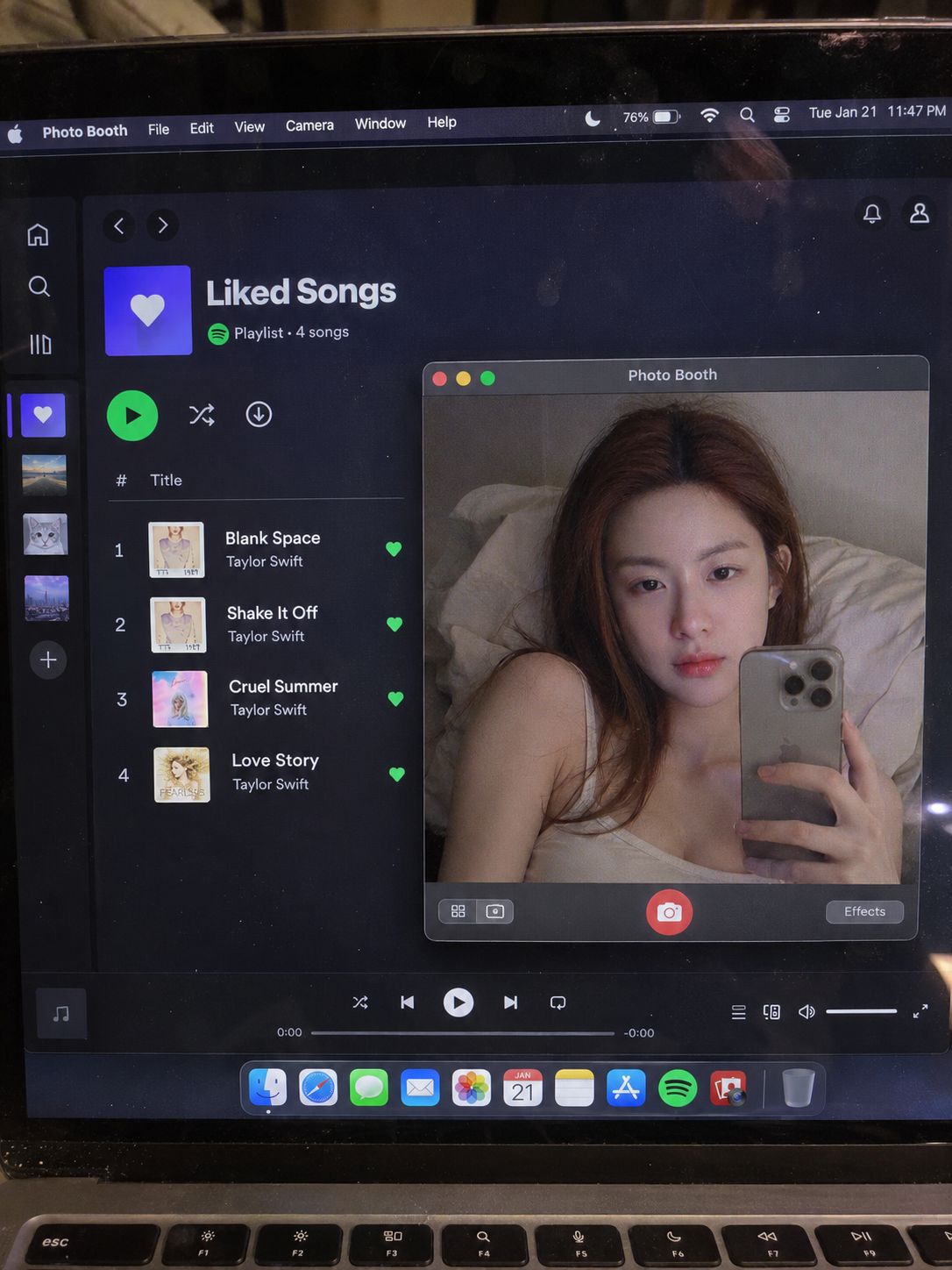
심야 노트북 화면 속 나른한 셀카
Lazy Selfie on a Late-Night Laptop Screen
‘심야 노트북 화면 속 나른한 셀카’은(는) gpt-image-2.5로 만든 작품입니다. OpenZhenZhen에서 원본 프롬프트와 생성 예시를 살펴보고 새로운 창작에 활용해 보세요.
프롬프트
중국어 프롬프트
以用户上传的参考图作为主要可见人物的面部身份依据。在不与身份参考冲突的情况下,保留来源的场景、造型、服装、姿势、构图、光线和视觉风格。 创作一张真实、未经修饰的智能手机照片,拍摄对象是MacBook实体屏幕,而不是屏幕截图。画面采用3:4竖幅构图(来源目标尺寸为1152 × 1536),使用高角度俯拍的第一人称视角。MacBook屏幕占据画面大部分,底部只露出一条薄薄的实体键盘。屏幕玻璃呈现可见的RGB像素网格、细微摩尔纹、微尘、隐约指纹和柔和环境反光。 MacBook运行macOS深色模式。后台打开Spotify的“喜欢的歌曲”列表,清晰显示以下四首曲名:“Blank Space – Taylor Swift”“Shake It Off – Taylor Swift”“Cruel Summer – Taylor Swift”“Love Story – Taylor Swift”。前景为悬浮在画面中右侧的Photo Booth实时预览窗口。 在实时预览里呈现参考图所提供的同一位成年女性,她是画面中唯一的人物,正躺在昏暗的卧室里,背景为灰白墙面和起皱的床铺。姿态放松、随意,表情自然且略显松弛,身穿浅色吊带衫,右手拿着iPhone 15 Pro。采用夜间低照度氛围,让冷色屏幕光与温暖肤色交融。保持她的面部、面部比例、眼睛形状、鼻子、嘴唇、肤色与皮肤纹理、发际线和整体身份;不得换脸、美颜、磨皮、重塑五官,也不要产生人工智能生成感。 整体保持未经抛光的自然手机实拍质感:有自然噪点、略有瑕疵的玻璃,不用影棚灯光,不做高清抛光。不要生成屏幕截图或扁平化UI。避免完美无瑕的屏幕、美颜滤镜感、卡通、3D渲染、绘画、水印或模糊的脸。 保持Spotify“喜欢的歌曲”列表区域宽阔且无遮挡。将悬浮的Photo Booth窗口放在画面中右侧并调整大小,使其完全避开曲名栏。四行曲目须同时完整显示并按以下顺序排列,每首歌名与艺人均清晰可读:“Blank Space – Taylor Swift”“Shake It Off – Taylor Swift”“Cruel Summer – Taylor Swift”“Love Story – Taylor Swift”。各行之间留出舒适间距。窗口及其边框不得覆盖列表;不得裁切、截断、重叠、反光遮盖、模糊或以其他方式遮挡任何曲名的任何部分。
영어 프롬프트
Use the uploaded reference image as the facial identity reference for the main visible person. Keep the source scene, styling, clothing, pose, composition, lighting and visual style unless they conflict with the identity reference. Create a raw, realistic smartphone photograph of a physical MacBook screen, not a screenshot. Compose as a 3:4 vertical image (the source target is 1152 × 1536). Use a high-angle downward point of view. The screen fills most of the frame, with only a thin strip of the physical keyboard visible along the bottom. Show screen-glass details: a visible RGB pixel grid, subtle moiré, tiny dust, faint fingerprints and soft ambient reflections. The MacBook runs macOS in dark mode. Spotify is open in the background on Liked Songs, with these four track titles legible in the list: “Blank Space – Taylor Swift,” “Shake It Off – Taylor Swift,” “Cruel Summer – Taylor Swift,” and “Love Story – Taylor Swift.” A Photo Booth live-preview window floats at center-right. Inside that live preview, show the same single adult woman whose facial identity is supplied by the reference, lying down in a dim bedroom. The setting has an off-white wall and rumpled bedding. She looks relaxed and candid, with a natural, slightly relaxed expression, and wears a light-colored tank top. She holds an iPhone 15 Pro in her right hand. Use low nocturnal light: cool screen glow mixed with warm skin tones. Preserve her face, facial proportions, eye shape, nose, lips, skin tone and texture, hairline and overall identity. Do not swap faces, beautify, smooth skin, reshape features or give her an artificial AI look. Keep the result like an unpolished, natural smartphone photo of a real display: natural noise, imperfect glass, no studio lighting and no glossy HD polish. Do not make a screenshot or flat UI image. Avoid a perfect or spotless screen, beauty-filter look, cartoon, 3D render, painting, watermark or blurred face. Keep the Spotify Liked Songs panel wide and unobstructed. Place and size the floating Photo Booth window at center-right, entirely clear of the track-title column. Show four separate complete rows at once, in this order, with every full title and artist plainly readable: “Blank Space – Taylor Swift,” “Shake It Off – Taylor Swift,” “Cruel Summer – Taylor Swift,” and “Love Story – Taylor Swift.” Leave comfortable space around the rows. Do not allow the window or its frame to overlap the list, and do not crop, truncate, overlap, glare over, blur or otherwise obscure any part of any title.
더 많은 이미지·동영상 프롬프트 보기 · 이미지 생성 · 동영상 생성 · AI 캔버스에서 만들기
관련 작품
- 카페 광고 포스터
‘카페 광고 포스터’은(는) Moss Image로 만든 작품입니다. OpenZhenZhen에서 원본 프롬프트와 생성 예시를 살펴보고 새로운 창작에 활용해 보세요.
- 매직 카드 마녀
‘매직 카드 마녀’은(는) Moss Image로 만든 작품입니다. OpenZhenZhen에서 원본 프롬프트와 생성 예시를 살펴보고 새로운 창작에 활용해 보세요.
- 왕실 도서관의 귀부인
‘왕실 도서관의 귀부인’은(는) Moss Image로 만든 작품입니다. OpenZhenZhen에서 원본 프롬프트와 생성 예시를 살펴보고 새로운 창작에 활용해 보세요.
- 달빛 아래 마을 테라스
‘달빛 아래 마을 테라스’은(는) Moss Image로 만든 작품입니다. OpenZhenZhen에서 원본 프롬프트와 생성 예시를 살펴보고 새로운 창작에 활용해 보세요.
- 해변 바의 모히토
‘해변 바의 모히토’은(는) Moss Image로 만든 작품입니다. OpenZhenZhen에서 원본 프롬프트와 생성 예시를 살펴보고 새로운 창작에 활용해 보세요.
- 꿈꾸는 정원의 로리타
‘꿈꾸는 정원의 로리타’은(는) Moss Image로 만든 작품입니다. OpenZhenZhen에서 원본 프롬프트와 생성 예시를 살펴보고 새로운 창작에 활용해 보세요.