OpenZhenZhen AI 프롬프트 갤러리 · gpt-image-2.5 · image
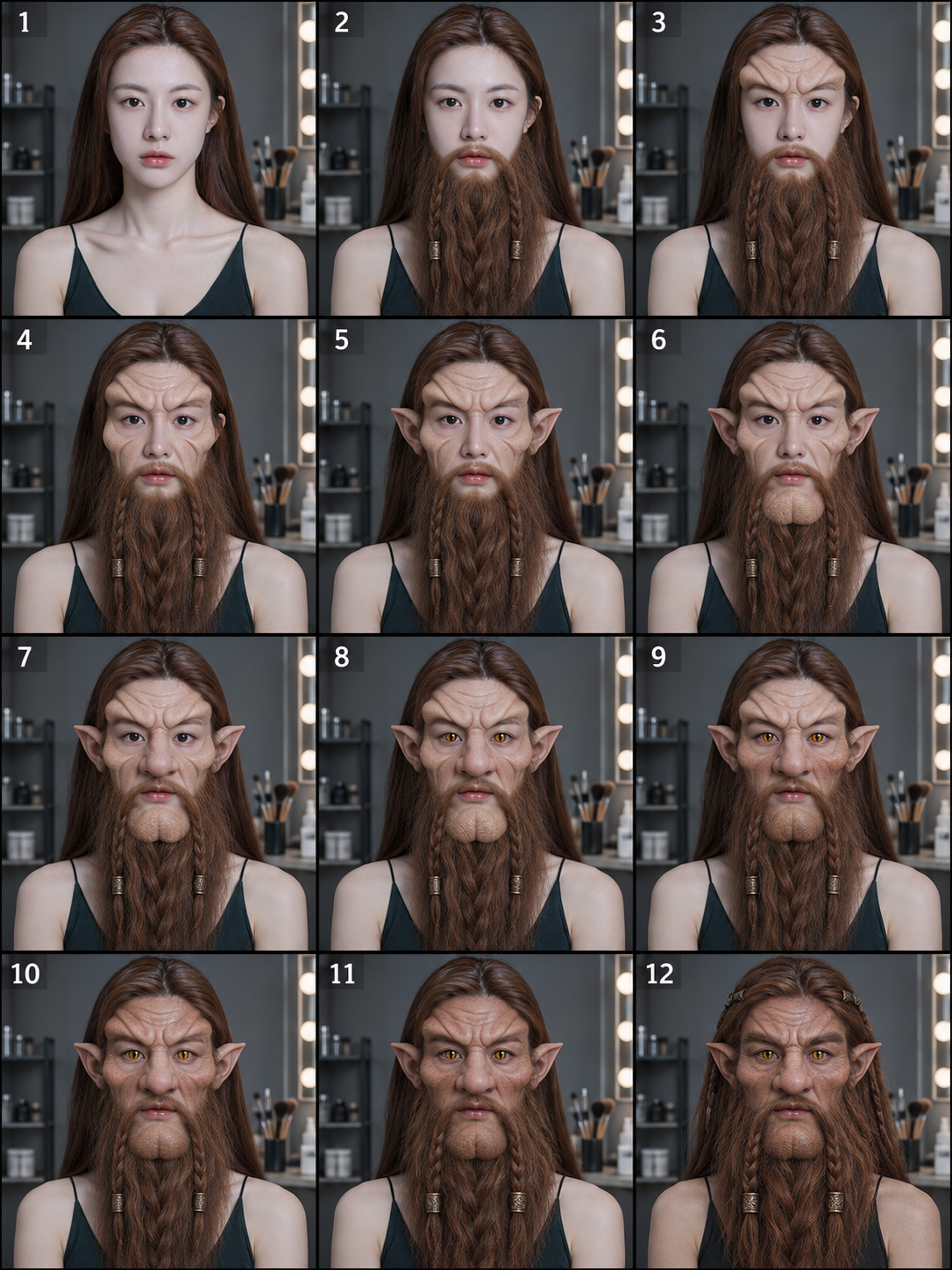
판타지 드워프 특수 분장 12단계 과정
Fantasy Dwarf Special Effects Makeup: 12-Step Process
‘판타지 드워프 특수 분장 12단계 과정’은(는) gpt-image-2.5로 만든 작품입니다. OpenZhenZhen에서 원본 프롬프트와 생성 예시를 살펴보고 새로운 창작에 활용해 보세요.
프롬프트
중국어 프롬프트
在特效化妆工作室创作一张清晰的3列×4行分镜。仅使用已配置的身份参考ref-10a-v1作为唯一人物的外貌参考;十二格均为同一人,通过化妆和假体呈现变身过程。按从左到右、从上到下的顺序展示以下累积步骤:1)人物素颜;2)加上延长胡须;3)添加额头假体;4)添加面颊假体;5)添加耳部假体;6)添加下巴假体;7)添加鼻部假体;8)佩戴虚构蛇形竖瞳效果的隐形眼镜;9)为面颊喷绘上色;10)为额头喷绘上色;11)为下巴喷绘上色;12)为其余细节喷绘并完成妆容,变为原创类人幻想矮人。各格尺寸一致、分隔清楚,保持统一的中性工作室灯光,并呈现可信的实用特效化妆过程。仅用小而清晰的数字1至12标示步骤。不要表现受伤或血腥,不要出现其他人物,也不要使用具体电影角色、系列、标志、水印或额外文字。
영어 프롬프트
Create one clear 3-column by 4-row storyboard in a practical-effects makeup studio. Use the configured identity_reference ref-10a-v1 as the sole person's appearance guide; show that same person consistently in all twelve panels, with the transformation expressed through makeup and prosthetics. Read left to right, top to bottom, and show these cumulative steps in order: 1) the person's normal face; 2) an elongated beard is applied; 3) forehead prosthetics are added; 4) cheek prosthetics are added; 5) ear prosthetics are added; 6) a chin prosthetic is added; 7) a nose prosthetic is added; 8) fictional snake-like slit-pupil contact lenses are added; 9) the cheeks are airbrushed; 10) the forehead is airbrushed; 11) the chin is airbrushed; 12) the remaining details are airbrushed and the makeup is finished as an original humanoid fantasy dwarf. Keep the panels equally sized and clearly separated, with consistent neutral studio lighting and a believable practical makeup process. Include only the small, legible numerals 1 through 12 to identify the steps. Do not depict injury or gore, add other people, or use a named film character, franchise, logo, watermark or extra text.
더 많은 이미지·동영상 프롬프트 보기 · 이미지 생성 · 동영상 생성 · AI 캔버스에서 만들기
관련 작품
- 코발트블루 운동복을 입은 네 가지 포즈의 피트니스 패션 화보
‘코발트블루 운동복을 입은 네 가지 포즈의 피트니스 패션 화보’은(는) gpt-image-2.5로 만든 작품입니다. OpenZhenZhen에서 원본 프롬프트와 생성 예시를 살펴보고 새로운 창작에 활용해 보세요.
- 인스타그램풍 저채도 스트리트 포토 콜라주
‘인스타그램풍 저채도 스트리트 포토 콜라주’은(는) gpt-image-2.5로 만든 작품입니다. OpenZhenZhen에서 원본 프롬프트와 생성 예시를 살펴보고 새로운 창작에 활용해 보세요.
- 밤 핑크 꽃가지 아래 직광 플래시 폰 스냅
‘밤 핑크 꽃가지 아래 직광 플래시 폰 스냅’은(는) gpt-image-2.5로 만든 작품입니다. OpenZhenZhen에서 원본 프롬프트와 생성 예시를 살펴보고 새로운 창작에 활용해 보세요.
- 중국 역대 복식 6칸 인물 초상
‘중국 역대 복식 6칸 인물 초상’은(는) gpt-image-2.5로 만든 작품입니다. OpenZhenZhen에서 원본 프롬프트와 생성 예시를 살펴보고 새로운 창작에 활용해 보세요.
- 황혼의 숲 땋은 머리 판타지 패션 인물화
‘황혼의 숲 땋은 머리 판타지 패션 인물화’은(는) gpt-image-2.5로 만든 작품입니다. OpenZhenZhen에서 원본 프롬프트와 생성 예시를 살펴보고 새로운 창작에 활용해 보세요.
- 빈티지 유럽 자전거 패션 청사진 콘셉트
‘빈티지 유럽 자전거 패션 청사진 콘셉트’은(는) gpt-image-2.5로 만든 작품입니다. OpenZhenZhen에서 원본 프롬프트와 생성 예시를 살펴보고 새로운 창작에 활용해 보세요.