OpenZhenZhen AI 프롬프트 갤러리 · gpt-image-2.5 · image
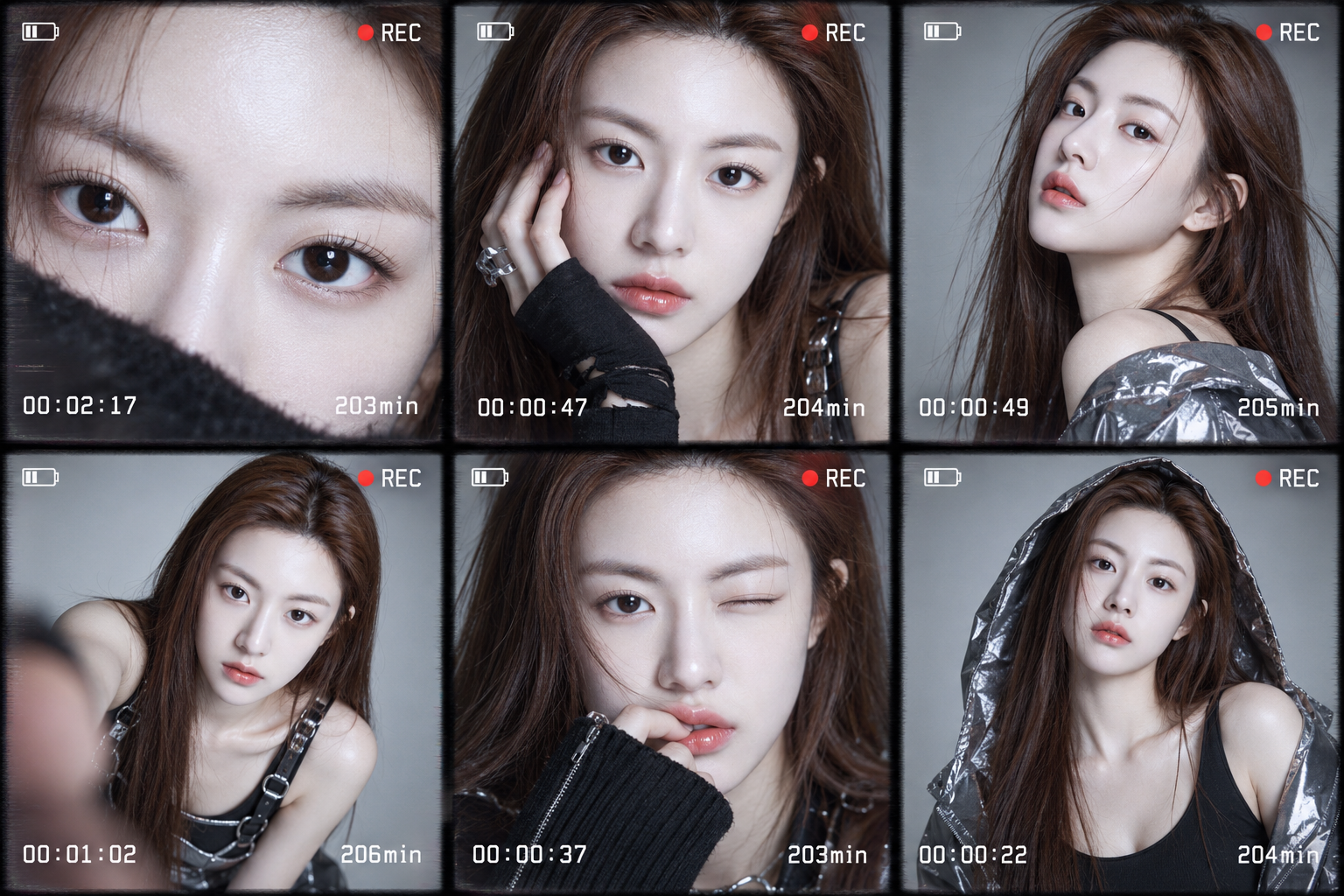
몽환적인 Z세대 6컷 사진 콜라주
Dreamy Gen Z Six-Panel Photo Collage
‘몽환적인 Z세대 6컷 사진 콜라주’은(는) gpt-image-2.5로 만든 작품입니다. OpenZhenZhen에서 원본 프롬프트와 생성 예시를 살펴보고 새로운 창작에 활용해 보세요.
프롬프트
중국어 프롬프트
创作一张电影感六格拼贴,准确包含the clearly adult model in configured identity reference ref-10a-v1, appearing as the same person in all six frames / 配置身份参考ref-10a-v1中的明确成年模特,六格均为同一人的六张特写与中景肖像;六格中的模特明确为成年人,并按ref-10a-v1保持同一张脸和同一身份。将六个不同的数码摄像机录制屏幕画面组成平衡拼贴。采用未来感Z世代时尚美学与梦幻空灵氛围,画面边缘带轻微手持晃动/摄像机柔化感,但模特面部必须锐利对焦。每格均显示a small battery icon, a red REC symbol, a white digital timer and a white minute counter / 小型电池图标、红色REC符号、白色数字计时器和白色分钟计数,并清楚呈现白色计时器与白色分钟计数。依次使用六个不同的白色计时值:00:02:17(203min)、00:00:47(204min)、00:00:49(205min)、00:01:02(206min)、00:00:37(203min)、00:00:22(204min)。六格的姿势、表情和机位各不相同:包括眼部极致特写、紧裁面部肖像和正面中景,不得重复画面。使用干净影棚光,在中性浅灰背景上形成柔和阴影。保持编辑时尚摄影质感与真实细节,屏显不得遮挡眼睛。不要增加第七格、其他人物、额外文字、标志或水印。
영어 프롬프트
Create a cinematic collage of exactly six close-up and medium-shot portraits of the clearly adult model in configured identity reference ref-10a-v1, appearing as the same person in all six frames / 配置身份参考ref-10a-v1中的明确成年模特,六格均为同一人, a clearly adult model whose face and identity remain consistent in every frame according to ref-10a-v1. Arrange six distinct digital-camcorder recording-screen frames in a balanced collage. Use a futuristic Gen-Z fashion aesthetic and a dreamy, ethereal atmosphere, with a slight handheld/shaky camcorder softness around the image edges while keeping the model's face tack sharp. Every frame has a small battery icon, a red REC symbol, a white digital timer and a white minute counter / 小型电池图标、红色REC符号、白色数字计时器和白色分钟计数. Keep each timer and minute counter legible and assign these six different white timer values in order: 00:02:17 (203min), 00:00:47 (204min), 00:00:49 (205min), 00:01:02 (206min), 00:00:37 (203min), 00:00:22 (204min). Show unique poses, expressions and camera angles in all six frames: an extreme close-up of the eyes, tight-cropped face portraits and frontal medium portraits, with no duplicate frame. Use clean studio lighting with soft shadows against a neutral light-gray background. Retain an editorial fashion-photography look and realistic detail without making the overlay obscure the eyes. Do not add a seventh frame, other people, extra text, logos or watermarks.
더 많은 이미지·동영상 프롬프트 보기 · 이미지 생성 · 동영상 생성 · AI 캔버스에서 만들기
관련 작품
- 초상화를 3D 봉제 인형으로
‘초상화를 3D 봉제 인형으로’은(는) gpt-image-2.5로 만든 작품입니다. OpenZhenZhen에서 원본 프롬프트와 생성 예시를 살펴보고 새로운 창작에 활용해 보세요.
- 같은 캐릭터의 다섯 시점, 몽환적인 스크랩북
‘같은 캐릭터의 다섯 시점, 몽환적인 스크랩북’은(는) gpt-image-2.5로 만든 작품입니다. OpenZhenZhen에서 원본 프롬프트와 생성 예시를 살펴보고 새로운 창작에 활용해 보세요.
- 로우 앵글 블랙 폴로 스튜디오 인물 사진
‘로우 앵글 블랙 폴로 스튜디오 인물 사진’은(는) gpt-image-2.5로 만든 작품입니다. OpenZhenZhen에서 원본 프롬프트와 생성 예시를 살펴보고 새로운 창작에 활용해 보세요.
- 세로형 라이브 방송 피켓 화면 템플릿
‘세로형 라이브 방송 피켓 화면 템플릿’은(는) gpt-image-2.5로 만든 작품입니다. OpenZhenZhen에서 원본 프롬프트와 생성 예시를 살펴보고 새로운 창작에 활용해 보세요.
- 모허 절벽의 일몰
‘모허 절벽의 일몰’은(는) Moss Image로 만든 작품입니다. OpenZhenZhen에서 원본 프롬프트와 생성 예시를 살펴보고 새로운 창작에 활용해 보세요.
- 열대우림 탐험가
‘열대우림 탐험가’은(는) Moss Image로 만든 작품입니다. OpenZhenZhen에서 원본 프롬프트와 생성 예시를 살펴보고 새로운 창작에 활용해 보세요.