OpenZhenZhen AI 프롬프트 갤러리 · gpt-image-2.5 · image
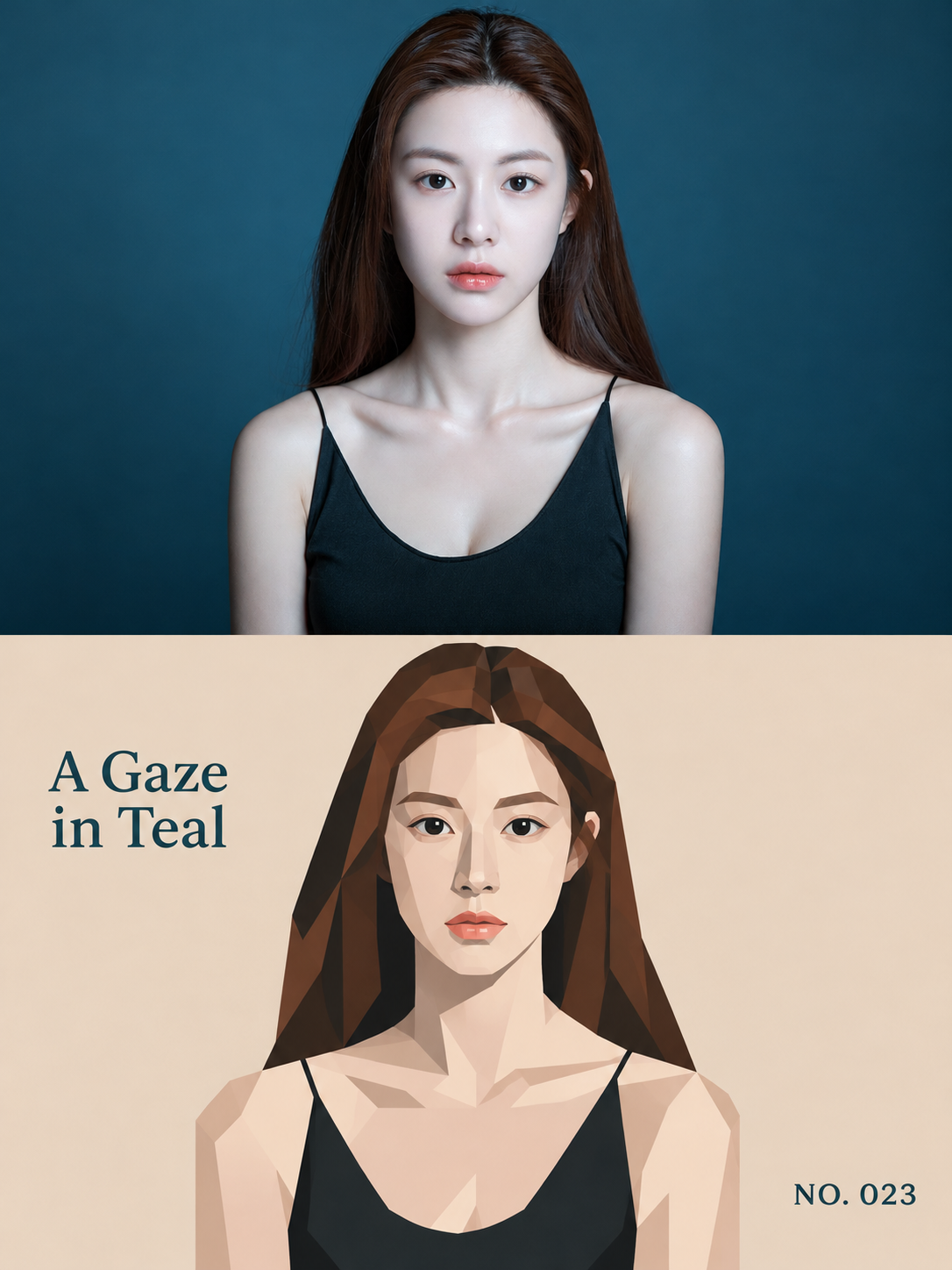
사실적 초상화와 기하학적 추상의 대조 포스터
Realistic Portrait and Geometric Abstraction Contrast Poster
‘사실적 초상화와 기하학적 추상의 대조 포스터’은(는) gpt-image-2.5로 만든 작품입니다. OpenZhenZhen에서 원본 프롬프트와 생성 예시를 살펴보고 새로운 창작에 활용해 보세요.
프롬프트
중국어 프롬프트
将已提供的 ref-10a-v1 整幅 JPG 作为实际源照片和唯一视觉参考。只为这张照片制作一张竖幅 3:4 对照艺术海报;若之后提供多张照片,每张分别制作,绝不拼接。画布上下严格等高,各占 50%,平滑衔接。不加边框、箭头或“Before/After”标签。 上半部——原始照片 将实际原始照片横向铺满画面。保留可见的成年女性、正面姿态与表情、场景、自然光线和主导色彩。照片中她留有深棕色长发、深色眼睛、珊瑚色嘴唇,穿黑色细肩带上衣,背景为深青蓝色。只允许轻微整体调色,不改变氛围、不加滤镜。保持源照片宽高比,不得拉伸女性主体。只裁去无关边缘;若适配半幅画面会裁掉关键特征,则仅少量延展周围背景。绝不虚构或改变女性主体及场景关键元素。 下半部——几何抽象 只以同一张实际照片为唯一参考,将同一位女性及少量可见环境特征重绘为硬边、扁平几何插画。不得添加原照片中没有的人物、动物、物体或动作。保留她的左右位置、正面姿态、目光方向、面部与发型轮廓及主要遮挡关系,使上下两半乍看对齐。删去次要细节,同时保留她具体可辨的身份特征;不得化为通用图标。使用数量有限、大小各异的多边形、简化曲线和相邻纯色色块构形。提取五至六种源图代表色——深青蓝、深棕、暖象牙色、低饱和珊瑚色、黑色及一种克制中性色——略微降低饱和度,下半部背景使用暖米白/米色,少数视觉焦点使用最深色调,并保留一种源图强调色。不得随意改变女性最具辨识度的颜色。边缘保持清晰锐利;只允许色块内极轻微颗粒和少数边缘微小套印偏移。不要渐变、描边、3D阴影、写实纹理、全幅粗糙纸纹或故障效果。 文字 在下半部负空间准确排出仅根据照片可见内容生成的短标题“青蓝凝望”,并完整保留编号“NO. 023”。标题不得遮挡主体;编号放在标题的对角位置。不要添加“Before/After”标签或其他可读文案。不得编造真实地点、日期、身份或事件。 成片 呈现克制的当代艺术书页:上方为丰富写实的原始照片,下方为与之配对、醒目有序且高度简化的几何诠释。保持无缝衔接和精确的上下各 50% 分屏。避免卡通脸、3D效果、塑料材质、冲突霓虹、随意涂鸦、无关道具或杂乱。
영어 프롬프트
Use the entire supplied ref-10a-v1 JPG as the actual source photograph and sole visual reference. Create one vertical 3:4 comparison-art poster for this photo only; if multiple photos are later supplied, make one separate poster per photo and never combine them. Divide the canvas into exactly equal upper and lower halves, 50% each, with a seamless transition. Add no border, arrow, or Before/After label. TOP HALF — ORIGINAL PHOTO Place the actual original photo across the full width. Preserve the visible adult woman, her forward-facing pose and expression, scene, natural lighting, and dominant colors. The photo shows long dark-brown hair, dark eyes, coral lips, a black thin-strap top, and a deep teal-blue background. Allow only subtle overall color correction, with no atmosphere change or filter. Preserve the source aspect ratio without stretching her. Crop only unimportant edges; if fitting the half would remove a key feature, minimally extend only the surrounding background. Never invent or alter the woman or key scene elements. BOTTOM HALF — GEOMETRIC ABSTRACT Using that exact same photo as the only reference, recreate the same woman and the few visible key environmental features as a hard-edged, flat geometric illustration. Add no people, animals, objects, or actions absent from the photo. Preserve her left/right position, forward-facing pose, gaze direction, facial/hair silhouette, and major overlaps so the two halves align at a glance. Remove secondary detail while retaining her specific recognizable identity; do not turn her into a generic icon. Construct the portrait from a limited number of varied polygons, simplified curves, and adjacent solid color blocks. Sample five or six representative source colors—deep teal, dark brown, warm ivory, muted coral, black, and one restrained neutral—slightly reduce saturation, use warm off-white/beige for the lower background, reserve the darkest tones for a few focal points, and retain a source-derived accent. Do not arbitrarily change her most recognizable colors. Keep edges crisp; allow only extremely subtle grain inside color blocks and tiny registration offsets on a few edges. No gradients, outlines, 3D shadows, realistic textures, rough full-frame paper grain, or glitch effects. TEXT In lower-half negative space, set the short photo-derived English title “A Gaze in Teal” and the exact number “NO. 023”. Keep the title clear of the subject and place the number diagonally opposite. Do not add Before/After labels or other readable copy. Do not invent a real place, date, identity, or event. FINISH Create a restrained contemporary art-book page: the rich, realistic original photo above and its bold, orderly, simplified geometric interpretation below. Keep the transition seamless and the exact 50/50 split. Avoid cartoon-like faces, 3D effects, plastic materials, clashing neon, random doodles, unrelated props, or clutter.
더 많은 이미지·동영상 프롬프트 보기 · 이미지 생성 · 동영상 생성 · AI 캔버스에서 만들기
관련 작품
- 여성 초상화 단어 대체 포스터
‘여성 초상화 단어 대체 포스터’은(는) gpt-image-2.5로 만든 작품입니다. OpenZhenZhen에서 원본 프롬프트와 생성 예시를 살펴보고 새로운 창작에 활용해 보세요.
- 한정 색상 분할 화면 만화 인물 포스터
‘한정 색상 분할 화면 만화 인물 포스터’은(는) gpt-image-2.5로 만든 작품입니다. OpenZhenZhen에서 원본 프롬프트와 생성 예시를 살펴보고 새로운 창작에 활용해 보세요.
- 인물과 직물이 흘러넘치는 벽면 부조 포스터
‘인물과 직물이 흘러넘치는 벽면 부조 포스터’은(는) gpt-image-2.5로 만든 작품입니다. OpenZhenZhen에서 원본 프롬프트와 생성 예시를 살펴보고 새로운 창작에 활용해 보세요.
- 원시 인물과 자연 소재 콜라주 편집 일러스트
‘원시 인물과 자연 소재 콜라주 편집 일러스트’은(는) gpt-image-2.5로 만든 작품입니다. OpenZhenZhen에서 원본 프롬프트와 생성 예시를 살펴보고 새로운 창작에 활용해 보세요.
- 원시 초상화와 미니어처 페이퍼크래프트 제2세계 포스터
‘원시 초상화와 미니어처 페이퍼크래프트 제2세계 포스터’은(는) gpt-image-2.5로 만든 작품입니다. OpenZhenZhen에서 원본 프롬프트와 생성 예시를 살펴보고 새로운 창작에 활용해 보세요.
- 플루티드 유리 인물 포스터
‘플루티드 유리 인물 포스터’은(는) gpt-image-2.5로 만든 작품입니다. OpenZhenZhen에서 원본 프롬프트와 생성 예시를 살펴보고 새로운 창작에 활용해 보세요.