OpenZhenZhen AI 프롬프트 갤러리 · gpt-image-2.5 · image
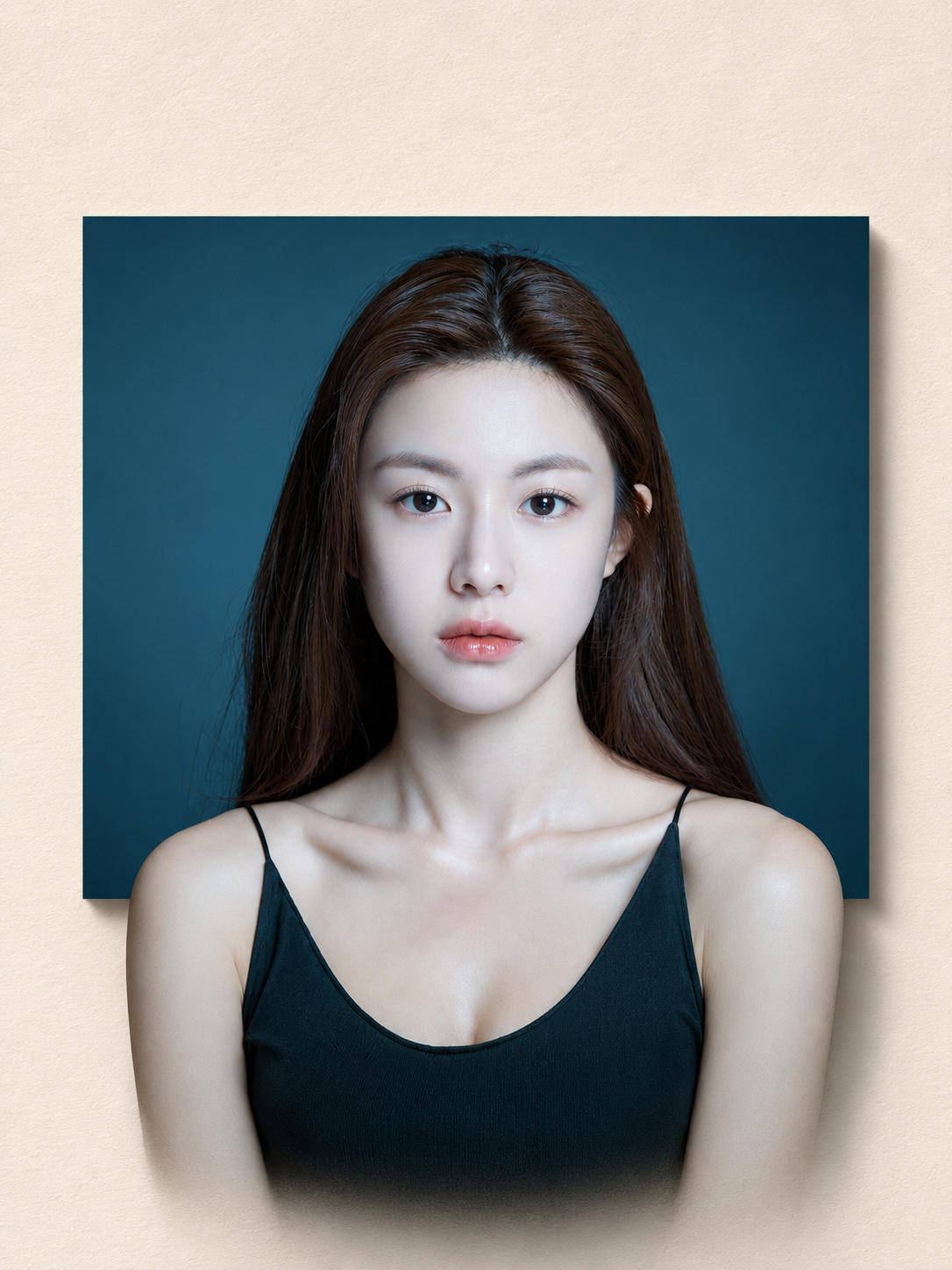
하이엔드 미니멀 매거진 스타일 3D 콜라주
High-End Minimalist Magazine-Style 3D Collage
‘하이엔드 미니멀 매거진 스타일 3D 콜라주’은(는) gpt-image-2.5로 만든 작품입니다. OpenZhenZhen에서 원본 프롬프트와 생성 예시를 살펴보고 새로운 창작에 활용해 보세요.
프롬프트
중국어 프롬프트
本次将已提供的 ref-10a-v1 整幅 JPG 作为实际原始照片。以暖象牙色、带细微纹理的纸张为背景,创作一张竖版 3:4 的高端极简杂志拼贴画。照片中是一位成年女性,留有深棕色长发,穿简洁的黑色细肩带上衣,背景为深青蓝色。完整保留照片及其中可见主体的原貌。 照片保留 无论原始照片出现在哪里,都保持完整且不变。保留女性可辨识的身份、面部特征、姿势、服装、色彩、纹理、自然光影及其他可见细节。不得重绘、修图、扭曲、拉伸或以其他方式改变原始照片。只使用实际提供的照片作为素材,不得替换为无关图像。 3D 弹出效果 仅使用这张照片中实际可见的女性及相关元素,构建精致、真实的立体杂志拼贴。让同一位女性及其可见头发和服装形成一个连续、准确对齐的抠像图层,延伸越过原照片框架的下边缘,突破图像边界。保持来源中的姿势、比例和可见细节;抠像应与完整照片中的主体自然衔接,不得看起来像第二个分离的人物。通过精准景深、自然透视和柔和真实的投影,使过渡无缝可信。不要虚构照片中不可见的场景、身体部位、物品或其他内容。 背景与艺术指导 使用暖象牙色、带细微纹理的纸张背景,并留出充足负空间。构图干净、克制、优雅,具有精致的高端杂志艺术指导和微妙的色调对比。照片出现之处均予以保留,不用新增文字或图形遮盖。来源未要求任何文字,因此不添加说明文字或装饰文字。 光效与成片效果 使用柔和的定向影棚光、细腻阴影和真实立体分层,增强纸张纹理及 3D 弹出效果,但不掩盖原始照片。成片应为精致的写实杂志拼贴,具备极简、优雅的高端设计杂志质感。保持竖版 3:4 比例。
영어 프롬프트
For this instance, use the entire supplied ref-10a-v1 JPG as the actual original photograph. Create a premium minimalist editorial collage on warm ivory, subtly textured paper, in a vertical 3:4 composition. The photo shows one adult woman with long dark-brown hair and a simple black thin-strap top against a deep teal-blue background. Preserve the full photo and its visible subject as they are. PHOTO PRESERVATION Keep the original photograph intact and unchanged wherever it appears. Preserve the woman's recognizable identity, facial features, pose, clothing, colors, textures, natural light and shadow, and other visible details. Do not redraw, retouch, distort, stretch, or otherwise alter the original photo. Use only the actual supplied photograph as source material; do not substitute unrelated imagery. 3D POP-OUT EFFECT Create a sophisticated, realistic three-dimensional editorial composition using only the woman and relevant visible elements from this same photograph. Let one continuous, accurately aligned cutout of the same woman and her visible hair/clothing extend beyond the lower edge of the original photo frame, breaking the image boundary. Maintain her source pose, proportions, and visible details; make the cutout connect naturally to the subject in the intact photo rather than appearing as a second disconnected person. Blend the transition seamlessly with precise depth, natural perspective, and soft realistic cast shadows. Do not invent scenery, body parts, objects, or other content not visible in the photo. BACKGROUND AND ART DIRECTION Use a warm ivory, subtly textured paper background with generous negative space. Keep the composition clean, understated, and elegant, with refined luxury-magazine art direction and subtle tonal contrast. Preserve the source photo wherever it appears; do not cover it with added text or graphics. The source does not request lettering, so add no caption or decorative text. LIGHTING AND FINISH Use soft directional studio lighting, delicate shadows, and realistic dimensional layers to enhance paper texture and the 3D pop-out without overwhelming the original photo. Deliver a polished photorealistic editorial collage with a minimal, sophisticated high-end design-magazine finish. Keep the vertical aspect ratio 3:4.
더 많은 이미지·동영상 프롬프트 보기 · 이미지 생성 · 동영상 생성 · AI 캔버스에서 만들기
관련 작품
- 겨울 스키 초상화
‘겨울 스키 초상화’은(는) Moss Image로 만든 작품입니다. OpenZhenZhen에서 원본 프롬프트와 생성 예시를 살펴보고 새로운 창작에 활용해 보세요.
- 안개 낀 봄 숲
‘안개 낀 봄 숲’은(는) Moss Image로 만든 작품입니다. OpenZhenZhen에서 원본 프롬프트와 생성 예시를 살펴보고 새로운 창작에 활용해 보세요.
- 인물 사진을 중국 목판 연화 구획 포스터로
‘인물 사진을 중국 목판 연화 구획 포스터로’은(는) gpt-image-2.5로 만든 작품입니다. OpenZhenZhen에서 원본 프롬프트와 생성 예시를 살펴보고 새로운 창작에 활용해 보세요.
- 밀밭 속의 소년
‘밀밭 속의 소년’은(는) Moss Image로 만든 작품입니다. OpenZhenZhen에서 원본 프롬프트와 생성 예시를 살펴보고 새로운 창작에 활용해 보세요.
- 사실적인 사진과 금박 장식 고서 표지 비주얼 포스터
‘사실적인 사진과 금박 장식 고서 표지 비주얼 포스터’은(는) gpt-image-2.5로 만든 작품입니다. OpenZhenZhen에서 원본 프롬프트와 생성 예시를 살펴보고 새로운 창작에 활용해 보세요.
- 크리스마스 이브 배달
‘크리스마스 이브 배달’은(는) Moss Image로 만든 작품입니다. OpenZhenZhen에서 원본 프롬프트와 생성 예시를 살펴보고 새로운 창작에 활용해 보세요.