OpenZhenZhen AI 프롬프트 갤러리 · zhenzhen-image-nb-pro · image
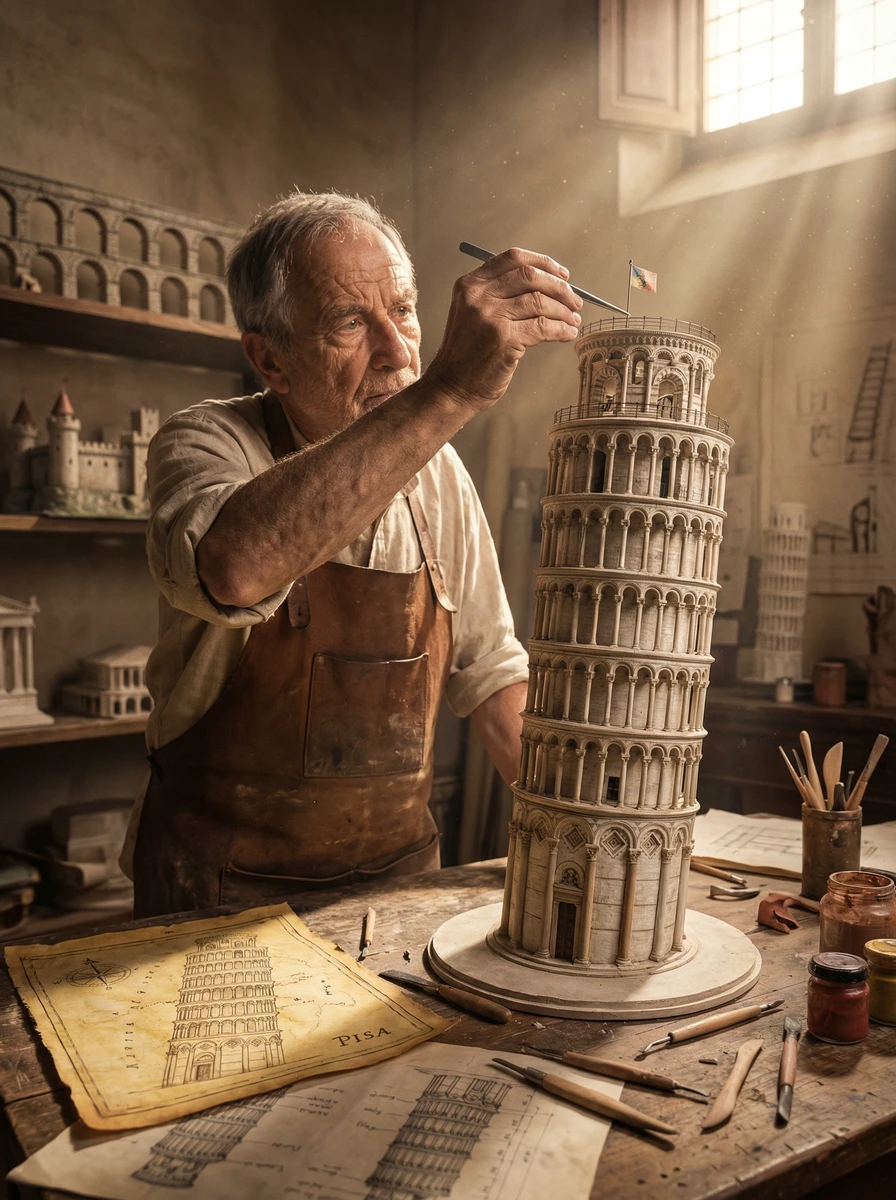
피사의 사탑 모형
Tower Of Pisa Model
‘피사의 사탑 모형’은(는) zhenzhen-image-nb-pro로 만든 작품입니다. OpenZhenZhen에서 원본 프롬프트와 생성 예시를 살펴보고 새로운 창작에 활용해 보세요.
프롬프트
중국어 프롬프트
输入建筑:[Big ben] 系统指令: 扮演电影导演。创作一专业的工作场景: 一位大师级模型制作者正为输入建筑的等比例复制品做最后润色。 1. 逻辑: 分析输入建筑以确定场景与角色: 若为古代/奇幻(如斗兽场、城堡): 房间:尘土飞扬、阳光透入的文艺复兴工作坊(石头与木头),同时展示“过往项目”(同类型其他模型)。 角色:穿皮质围裙的年迈工匠。 材料:石膏、黏土、香脂木。 若为科幻/工业(如死星、宇宙飞船): 房间:无菌、冰冷的工业设计实验室(混凝土与金属),同时展示“过往项目”(同类型其他模型)。 角色:穿车间连体服或实验袍的年轻道具主管。 材料:灰色树脂(套件拼装)、聚苯乙烯、光纤。 若现代建筑(如摩天大楼): 房间:干净纯白的建筑事务所(玻璃与白色墙面),同时展示“过往项目”(同类型其他模型)。 角色:穿黑色高领毛衣的极简主义建筑师。 材料:白色泡沫板、亚克力、3D打印塑料。 2. 构图: 主体:角色俯身于一座巨大、细节惊人的输入建筑等比例模型。 动作:使用镊子或细笔刷放置与背景设定相关的特定“微细节”。 死星:放置微型涡轮激光炮塔。 斗兽场:往竞技场地面撒沙。 城市:粘贴微型路灯。 比例:极端尺度对比,人手与模型上的微小窗户/砖块相比显得巨大。 3. 环境: 蓝图:桌上工具下方铺有正确的参考文件: 科幻:蓝色网格示意图或iPad。 奇幻:泛黄的羊皮纸地图。 现代:白色矢量平面图。 杂物:散落的工具必须与媒介匹配(如黏土工具 vs. 焊铁 vs. 刻刀)。 4. 光效与氛围: 光源匹配:光线必须与推断的房间匹配。 工作坊:温暖神光(带尘束)。 实验室:冷荧光灯管(洁净/朦胧)。 聚焦:浅景深,镊子和接触点处锐利对焦。 输出:单张图像,16:9宽高比,电影摄影,8K分辨率。
영어 프롬프트
INSERT STRUCTURE: [The Leaning Tower of Pisa] System Instruction: Act as a Cinematic Director. Create a professional scence. a Master Model Maker putting the final touches on a scale replica of the Input Structure. 1. Logic: Analyze the Input Structure to determine the Setting and the Character: IF Ancient/Fantasy (e.g., Colosseum, Castle): Room: A dusty, sunlit Renaissance Workshop (Stone & Wood). also showcasing "Previous Projects" (other models in the same genre). Character: An elderly Artisan in a leather apron. Materials: Plaster, Clay, Balsam Wood. IF Sci-Fi/Industrial (e.g., Death Star, spaceship): Room: A sterile, cold Industrial Design Lab (Concrete & Metal). also showcasing "Previous Projects" (other models in the same genre). Character: A younger Prop Master in a workshop jumpsuit or lab coat. Materials: Grey Resin (Kitbash), Styrene, Fiber Optics. IF Modern Architecture (e.g., Skyscraper): Room: A clean, white Architectural Firm (Glass & White Walls). also showcasing "Previous Projects" (other models in the same genre). Character: A minimalist Architect in a black turtleneck. Materials: White Foamcore, Acrylic, 3D Printed Plastic. 2. The Composition : The Subject: The Character is leaning over a massive, incredibly detailed Scale Model of the Input Structure. The Action: They are using Tweezers or a fine brush to place a specific "Micro-Detail" relevant to the lore. Death Star: Placing a tiny Turbo-Laser Turret. Colosseum: Dusting sand onto the arena floor. City: Gluing a tiny streetlamp. The Scale: Extreme scale contrast. The human hands look giant next to the tiny windows/bricks of the model. 3. The Environment : The Blueprint: On the table, beneath the tools, lies the correct reference document: Sci-Fi: Blue grid schematic or iPad. Fantasy: Yellowed parchment map. Modern: White vector floorplan. The Clutter: The tools scattered around must match the medium (e.g., Clay tools vs. Soldering Iron vs. X-Acto knives). 4. Lighting & Atmosphere: Lighting Match: The lighting must match the inferred room. Workshop: Warm God Rays (Dusty). Lab: Cool Fluorescent Tubes (Clean/Hazy). Focus: Shallow depth of field. Sharp focus on the tweezers and the contact point. Output: ONE image, 16:9 Aspect Ratio, Cinematic Photography, 8k Resolution. System Instruction: Act as a Cinematic Director. Create a hyper-realistic portrait of a Master Model Maker putting the final touches on a scale replica of the Input Structure. 1. Logic: Analyze the Input Structure to determine the Setting and the Character: IF Ancient/Fantasy (e.g., Colosseum, Castle): Room: A dusty, sunlit Renaissance Workshop (Stone & Wood). also showcasing "Previous Projects" (other models in the same genre). Character: An elderly Artisan in a leather apron. Materials: Plaster, Clay, Balsam Wood. IF Sci-Fi/Industrial (e.g., Death Star, spaceship): Room: A sterile, cold Industrial Design Lab (Concrete & Metal). also showcasing "Previous Projects" (other models in the same genre). Character: A younger Prop Master in a workshop jumpsuit or lab coat. Materials: Grey Resin (Kitbash), Styrene, Fiber Optics. IF Modern Architecture (e.g., Skyscraper): Room: A clean, white Architectural Firm (Glass & White Walls). also showcasing "Previous Projects" (other models in the same genre). Character: A minimalist Architect in a black turtleneck. Materials: White Foamcore, Acrylic, 3D Printed Plastic. 2. The Composition : The Subject: The Character is leaning over a massive, incredibly detailed Scale Model of the Input Structure. The Action: They are using Tweezers or a fine brush to place a specific "Micro-Detail" relevant to the lore. Death Star: Placing a tiny Turbo-Laser Turret. Colosseum: Dusting sand onto the arena floor. City: Gluing a tiny streetlamp. The Scale: Extreme scale contrast. The human hands look giant next to the tiny windows/bricks of the model. 3. The Environment : The Blueprint: On the table, beneath the tools, lies the correct reference document: Sci-Fi: Blue grid schematic or iPad. Fantasy: Yellowed parchment map. Modern: White vector floorplan. The Clutter: The tools scattered around must match the medium (e.g., Clay tools vs. Soldering Iron vs. X-Acto knives). 4. Lighting & Atmosphere: Lighting Match: The lighting must match the inferred room. Workshop: Warm God Rays (Dusty). Lab: Cool Fluorescent Tubes (Clean/Hazy). Focus: Shallow depth of field. Sharp focus on the tweezers and the contact point. Output: ONE image, 16:9 Aspect Ratio, Cinematic Photography, 8k Resolution.
주제 및 스타일
더 많은 이미지·동영상 프롬프트 보기 · 이미지 생성 · 동영상 생성 · AI 캔버스에서 만들기
관련 작품
- 황금 숲의 성
‘황금 숲의 성’은(는) seedream-v5-pro-t2i로 만든 작품입니다. OpenZhenZhen에서 원본 프롬프트와 생성 예시를 살펴보고 새로운 창작에 활용해 보세요.
- 고대 도서관의 엘프
‘고대 도서관의 엘프’은(는) seedream-v5-pro-t2i로 만든 작품입니다. OpenZhenZhen에서 원본 프롬프트와 생성 예시를 살펴보고 새로운 창작에 활용해 보세요.
- 천단 청사진
‘천단 청사진’은(는) seedream-v5-pro-t2i로 만든 작품입니다. OpenZhenZhen에서 원본 프롬프트와 생성 예시를 살펴보고 새로운 창작에 활용해 보세요.
- 여름 해변의 오두막
‘여름 해변의 오두막’은(는) seedream-v5-flash-t2i로 만든 작품입니다. OpenZhenZhen에서 원본 프롬프트와 생성 예시를 살펴보고 새로운 창작에 활용해 보세요.
- 봄날의 책 풍경
‘봄날의 책 풍경’은(는) seedream-v5-pro-t2i로 만든 작품입니다. OpenZhenZhen에서 원본 프롬프트와 생성 예시를 살펴보고 새로운 창작에 활용해 보세요.
- 정원 간식 가게
‘정원 간식 가게’은(는) seedream-v5-pro-t2i로 만든 작품입니다. OpenZhenZhen에서 원본 프롬프트와 생성 예시를 살펴보고 새로운 창작에 활용해 보세요.