OpenZhenZhen AI 提示词画廊 · gpt-image-2.5 · image
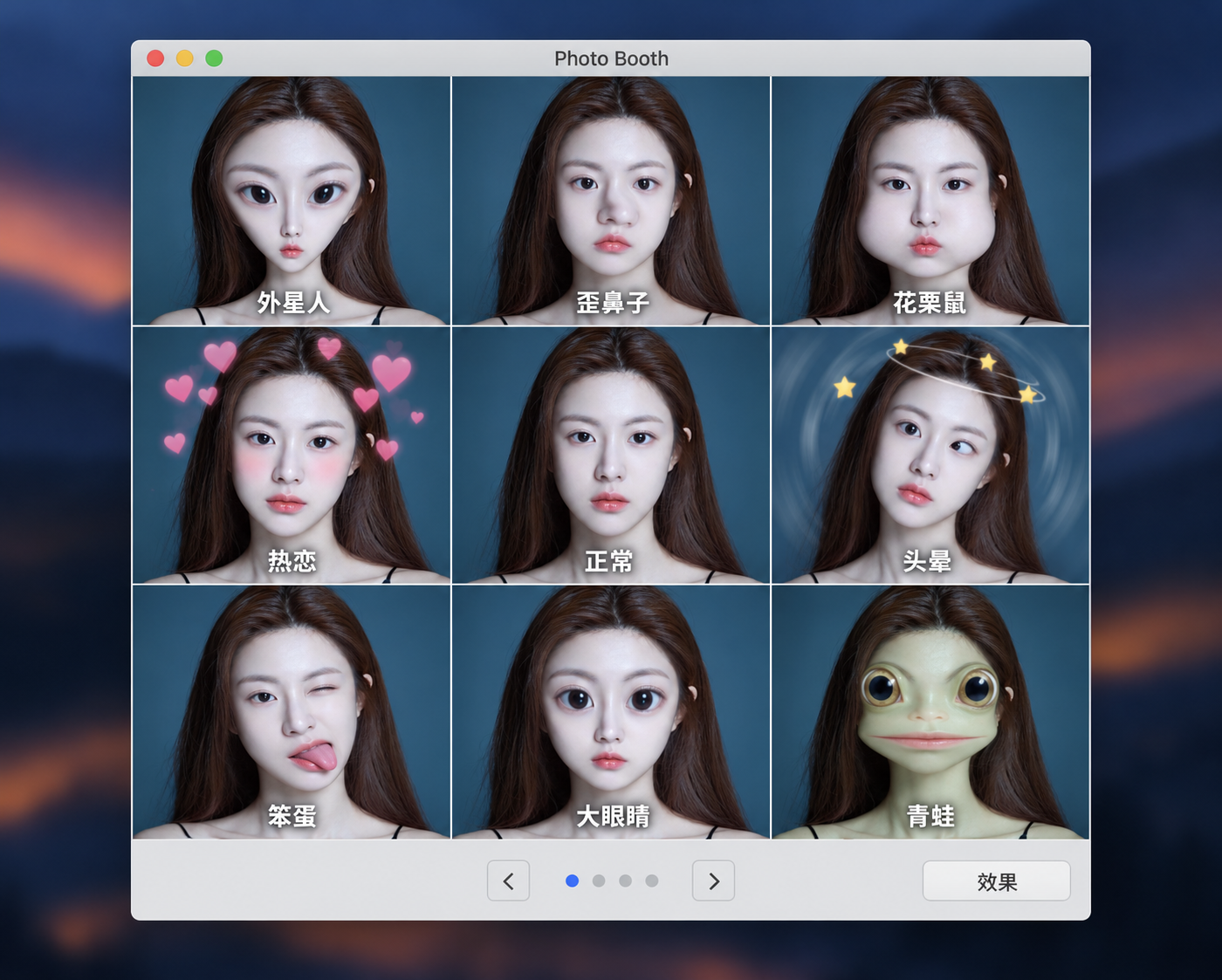
九宫格趣味相机特效界面
Fun 3x3 Grid Camera Effect Interface
一张完整的Photo Booth风格应用窗口截图,以同一人物展示九种趣味滤镜,并保留中文效果字幕、窗口标题和底部导航控件。
提示词 / Prompt
中文提示词
创作一张完整的桌面端macOS风格Photo Booth应用窗口界面截图,顶部标题栏中央准确显示“Photo Booth”。主预览区采用整齐、间距均匀的3×3网格。九个格子都显示同一位用户上传的人物,依据固定参考ref-10a-v1保持面部身份一致,同时分别应用清晰可辨、轻松有趣的相机特效。每格底部加清晰的白色中文字幕,严格按从左到右、从上到下的顺序写为:第一排“外星人”“歪鼻子”“花栗鼠”;第二排“热恋”“正常”“头晕”;第三排“笨蛋”“大眼睛”“青蛙”。每个字幕都留在对应格子内并确保可读。特效分别表现为外星人脸部滤镜、歪鼻变形、花栗鼠鼓腮、漂浮爱心、未经处理的正常人像、轻柔眩晕旋涡、滑稽笨蛋式变形、放大眼睛和青蛙感脸部滤镜。正常预览位于中央。网格下方设置灰色控制栏,包含左箭头、右箭头、四个小导航圆点(仅第一个为蓝色)和标有“效果”的按钮。应用窗口置于深色、柔和虚化的桌面背景上。保持可信的截图式界面层级,网格线笔直、控件对齐、UI配色克制中性。不要添加额外面板、无关标签、伪造系统警告;除指定应用标题外不加标志或水印。
English prompt
Create a complete desktop screenshot mockup of a macOS-style Photo Booth application window, with the exact title “Photo Booth” centered in the top title bar. The main preview area is a clean, evenly spaced 3x3 grid. Every tile shows the same user-uploaded person, preserving facial identity from fixed reference ref-10a-v1 while applying a different recognizable playful camera effect. Add crisp white Chinese captions along the bottom inside each tile, in this exact left-to-right, top-to-bottom order: top row “外星人”, “歪鼻子”, “花栗鼠”; middle row “热恋”, “正常”, “头晕”; bottom row “笨蛋”, “大眼睛”, “青蛙”. Keep each label inside its own cell and legible. Make the effects visually distinct but lighthearted: alien facial filter, crooked-nose warp, chipmunk cheeks, floating hearts, an unfiltered normal portrait, gentle dizzy swirl, silly fool-like distortion, enlarged eyes and frog-like face filter. The normal preview is centered. Below the grid, add a gray control bar with a left arrow, a right arrow, four small navigation dots with only the first dot blue, and a button labeled “效果”. Place the app window against a dark softly blurred desktop background. Preserve a convincing screenshot/interface hierarchy with straight grid lines, aligned controls and restrained neutral UI colors. No extra panels, additional labels, fake operating-system alerts, logos beyond the requested app title, or watermark.
探索更多图片和视频提示词 · 生成图片 · 生成视频 · 在 AI 画布中创作
相关作品
- 特斯拉电动车核心部件示意全景
横向概念示意海报:以未指定车型的特斯拉电动车为中心,周围安排若干模块放大细节。电池包、电驱电机、逆变器/电力电子、车载充电器、热管理回路、悬架与制动、充电接口均为整理者选定的示意模块,不是来源列明的清单,也不代表特定车型布局或工程规格。 / A landscape conceptual overview centered on a Tesla EV of unspecified model, surrounded by selected module detail callouts. Battery pack, drive motor, inverter/power electronics,
- 日系负片里的记忆碎片
A 9:16 candid Japanese negative-film style portrait. The adult person, unposed walk and quiet neighborhood lane are replaceable curator-selected defaults, not subject or scene details supplied by the source. The currently configured ref-10a-v1 is used as the generic person identity reference and is
- 1girl
gpt image2.5生成
- 法式风情地标美食海报
A premium, clean and elegant poster concept built from the source’s broad request. Eiffel Tower, Arc de Triomphe, ratatouille and Provençal bouillabaisse are curator-selected illustrative examples, not details stated by the source; they can be replaced in a future variant. The source example image i
- 梦回江户浮世绘古典人物像
A reference-led Edo-period ukiyo-e portrait transformation that preserves the supplied person’s facial identity while restyling hair, clothing and accessories in traditional Japanese fashion. The current ref-10a-v1 is the generic person preview for this workflow, not a claim about any external named
- 盛世长安万国来朝图
A text-driven historical reconstruction of the source scene: an aerial view of Kaiyuan-era Chang’an, Emperor Xuanzong and Yang Guifei looking out from Hanyuan Hall, and a distant tribute procession. The configured generic portrait is used only as a face-identity anchor for Yang Guifei in this genera