OpenZhenZhen AI 프롬프트 갤러리 · gpt-image-2.5 · image
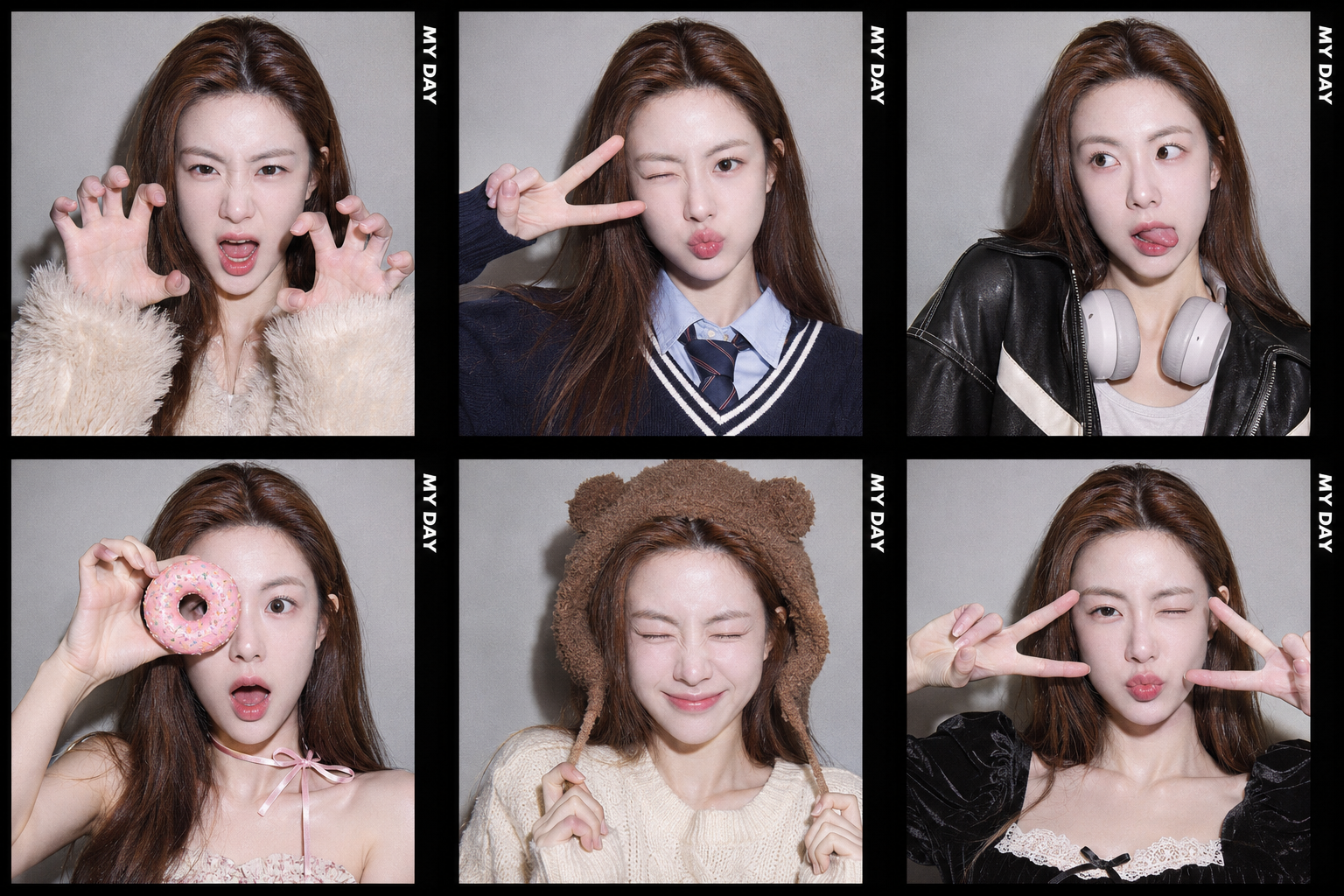
한국 포토부스 6컷 캐릭터 레퍼런스 콜라주
Korean Photo Booth Six-Frame Character Reference Collage
‘한국 포토부스 6컷 캐릭터 레퍼런스 콜라주’은(는) gpt-image-2.5로 만든 작품입니다. OpenZhenZhen에서 원본 프롬프트와 생성 예시를 살펴보고 새로운 창작에 활용해 보세요.
프롬프트
중국어 프롬프트
创作一张超写实 PHOTOISM 风格的韩国照片亭拼贴,采用精确的 3×2 网格:三列两行,共 6 张彼此区分的照片。仅使用已绑定到 ref-10a-v1 的 identity_reference 作为唯一人物参考,并确保六帧中始终保留同一张真实且可辨识的脸。每帧随机选择不同服装,同时保持人物身份和照片亭环境一致;不需要另行提供外观参考图片。每帧均加粗黑色 PHOTOISM 风格边框,并在每帧右侧边缘清晰竖排准确文字“MY DAY”。场景设于室内照片亭,背景为纯浅灰墙面;使用温暖的 iPhone 风格直闪,略微过曝,并加入柔和演播室补光和真实照片亭胶片颗粒。姿势与表情俏皮、荒诞且充满活力,同时保持面部特征清晰一致和高分辨率写实细节。网格干净利落、焦点清晰、对比度较高,呈现精致的照片亭美学。除每帧重复竖排的“MY DAY”外不得出现其他文字;避免色彩过于鲜艳、背景杂乱、模糊、低质量、面部畸变、手部畸形、比例错误、排版混乱、噪点过多、卡通风格、不真实细节、标志或水印。
영어 프롬프트
Create one hyper-realistic PHOTOISM-style Korean photo-booth collage as an exact 3×2 grid: three columns and two rows, containing exactly 6 distinct photographs. Use the attached identity_reference bound to ref-10a-v1 as the sole character/person reference and preserve the same recognizable real face consistently in all six frames. Give each frame a different randomly chosen outfit while keeping the person and photobooth setting coherent; do not require a separate appearance-reference image. Add a thick black PHOTOISM-style border to every frame, with the exact text “MY DAY” clearly set vertically along the right edge inside each frame. Use an indoor photo-booth setting with a solid light-gray wall, warm iPhone-style direct flash with slight overexposure, soft studio fill and authentic photobooth film-grain texture. Make the poses and expressions playful, absurd and energetic while retaining clear, consistent facial features and realistic high-resolution detail. Keep the grid clean, sharp and high-contrast with a sophisticated photobooth aesthetic. Do not add any text beyond the repeated vertical “MY DAY”; avoid overly vibrant colors, a messy background, blur, low quality, distorted faces, malformed hands, bad proportions, messy typography, excessive noise, cartoon style, unrealistic details, logos or watermarks.
더 많은 이미지·동영상 프롬프트 보기 · 이미지 생성 · 동영상 생성 · AI 캔버스에서 만들기
관련 작품
- 청록색 배경 인물 사진 변환
‘청록색 배경 인물 사진 변환’은(는) gpt-image-2.5로 만든 작품입니다. OpenZhenZhen에서 원본 프롬프트와 생성 예시를 살펴보고 새로운 창작에 활용해 보세요.
- 태엽 장치의 하늘: 1분 스팀펑크 모험 콘티
‘태엽 장치의 하늘: 1분 스팀펑크 모험 콘티’은(는) gpt-image-2.5로 만든 작품입니다. OpenZhenZhen에서 원본 프롬프트와 생성 예시를 살펴보고 새로운 창작에 활용해 보세요.
- 청록색 인물 고정보 광고 포스터
‘청록색 인물 고정보 광고 포스터’은(는) gpt-image-2.5로 만든 작품입니다. OpenZhenZhen에서 원본 프롬프트와 생성 예시를 살펴보고 새로운 창작에 활용해 보세요.
- 청록색 인물 초상 개인 이미지 전단지
‘청록색 인물 초상 개인 이미지 전단지’은(는) gpt-image-2.5로 만든 작품입니다. OpenZhenZhen에서 원본 프롬프트와 생성 예시를 살펴보고 새로운 창작에 활용해 보세요.
- 틸 앤 오렌지 황무지: 사막 추격의 생존자들
‘틸 앤 오렌지 황무지: 사막 추격의 생존자들’은(는) gpt-image-2.5로 만든 작품입니다. OpenZhenZhen에서 원본 프롬프트와 생성 예시를 살펴보고 새로운 창작에 활용해 보세요.
- 차가운 회색 미니멀 실내의 투명 우비를 입고 도끼를 든 초상
‘차가운 회색 미니멀 실내의 투명 우비를 입고 도끼를 든 초상’은(는) gpt-image-2.5로 만든 작품입니다. OpenZhenZhen에서 원본 프롬프트와 생성 예시를 살펴보고 새로운 창작에 활용해 보세요.