OpenZhenZhen AI 프롬프트 갤러리 · gpt-image-2.5 · image
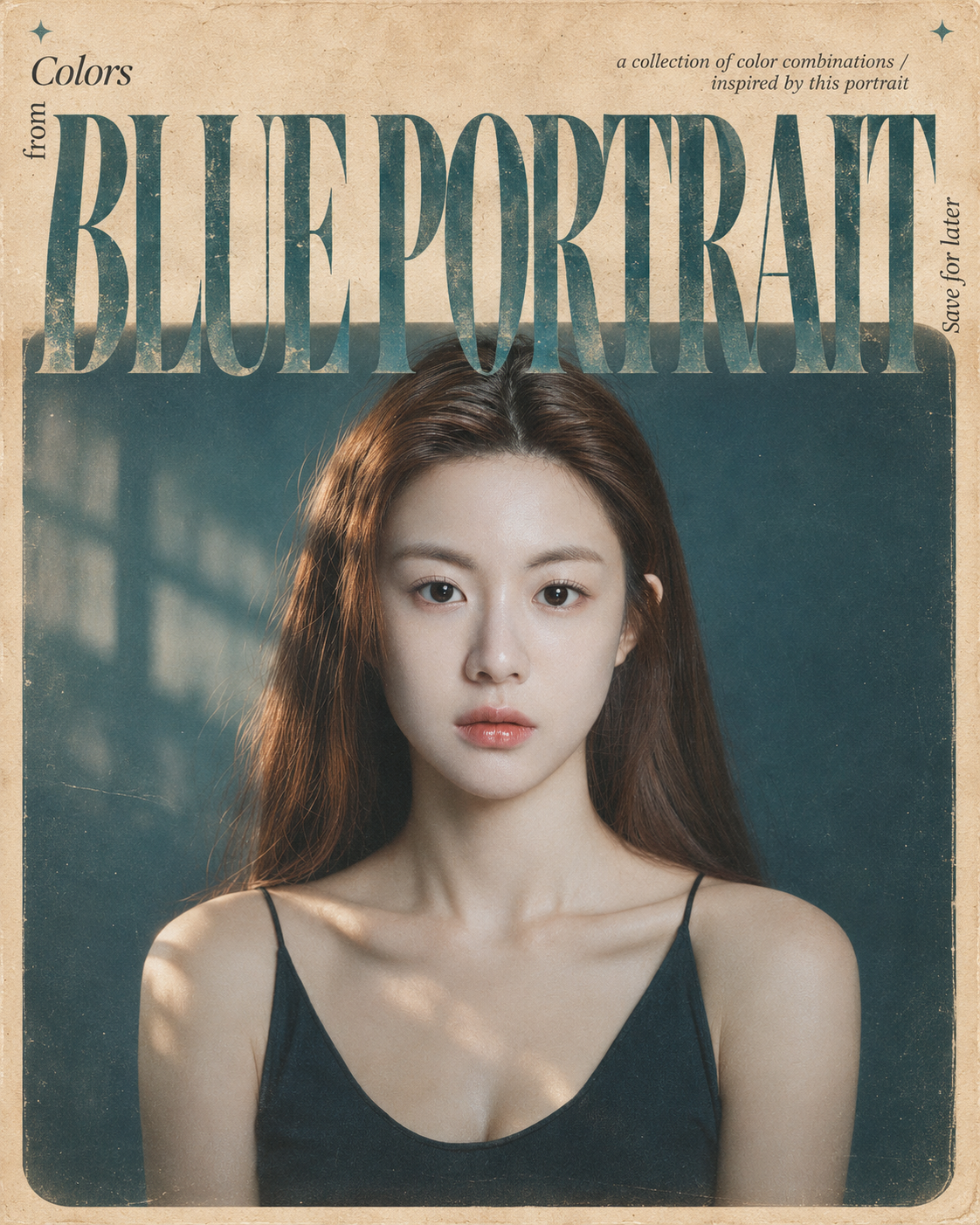
레트로 독립 잡지 편집 스타일 포스터
Retro Independent Magazine Editorial Poster
‘레트로 독립 잡지 편집 스타일 포스터’은(는) gpt-image-2.5로 만든 작품입니다. OpenZhenZhen에서 원본 프롬프트와 생성 예시를 살펴보고 새로운 창작에 활용해 보세요.
프롬프트
중국어 프롬프트
本次将已提供的 ref-10a-v1 整幅 JPG 作为实际视觉参考。创作一张精致复古灵感的竖版 4:5 社论海报。照片中是一位成年女性,留有深棕色长发,穿黑色细肩带上衣,背景为深青蓝色。保留她可辨识的身份与肖像含义,同时创作受她启发的全新电影感写实构图;不要只是把未改变的原图放进相框。不要虚构人物姓名或事实地点。 纸张与摄影面板 采用温暖浅米色的做旧纸张背景,带有细微纤维、细腻颗粒和真实复古印刷瑕疵。画面大部分区域放置一块大型矩形电影感摄影面板,四周留窄米色边框;面板底部边角柔和圆润,并呈现褪色模拟胶片效果。创作同一位可辨识女性的全新自然光肖像构图,呈现大气纵深、柔和色彩、真实纹理、细微 35mm 胶片颗粒和柔和褪色的对比度。选择适合原肖像的克制环境与色彩氛围,不添加无关主体或道具。 超大标题 在海报上三分之一处横跨画面设置准确标题“BLUE PORTRAIT”,使用巨大、高对比度的衬线字体,接近左右边缘;字形高挑精致,粗细笔画对比鲜明,字距紧凑。使用柔和灰蓝青绿色,带细微摄影纹理和风化墨迹。让字母与照片上部重叠,使排版和图像融合为一体。 小型社论细节 在标题左上附近加入小字“Colors”,并在下方竖排“from”。在右上附近加入以下准确的极小副标题:“a collection of color combinations / inspired by this portrait”。在标题右边缘旁竖排“Save for later”。在米色背景左上角和右上角附近各放一颗极小的四角青绿色星星。 色彩与成片 使用暖奶油色、柔和灰蓝青绿色、低饱和天蓝色及从肖像自然提取的大地色调。保持自然电影感光线,构图平衡、高级、怀旧且简洁,呈现独立设计杂志质感。准确、清晰地呈现每个指定词句。避免水印、亮面数字效果、过度饱和和不必要装饰。
영어 프롬프트
For this instance, use the entire supplied ref-10a-v1 JPG as the actual visual reference. Create a sophisticated vintage-inspired editorial poster in a vertical 4:5 aspect ratio. The image shows one adult woman with long dark-brown hair and a black thin-strap top against a deep teal-blue background. Preserve her recognizable identity and the meaning of the portrait while creating a new cinematic, photorealistic composition inspired by her; do not merely place the unchanged source image inside a frame. Do not invent a personal name or factual location. PAPER AND PHOTO PANEL Use a warm, pale-beige aged-paper background with subtle fibers, fine grain, and authentic vintage-print imperfections. Place a large rectangular cinematic photographic panel across most of the canvas, leaving a narrow beige border; give the panel softly rounded bottom corners and a faded analog-film appearance. Create a new natural-light portrait composition of the same recognizable woman, with atmospheric depth, muted colors, authentic texture, subtle 35mm film grain, and softly faded contrast. Choose an understated environment and color atmosphere that suit the source portrait without adding unrelated subjects or props. OVERSIZED TITLE Across the upper third of the poster, set the exact headline “BLUE PORTRAIT” in enormous high-contrast serif lettering, almost edge to edge, with tall refined forms, dramatic thick-and-thin strokes, and tight spacing. Use muted dusty turquoise-blue, subtle photographic texture, and weathered ink. Let the letters overlap the upper part of the photograph, blending typography and imagery into one editorial composition. SMALL EDITORIAL DETAILS Near the upper-left of the headline, add the small heading “Colors” and arrange “from” vertically beneath it. Near the upper-right, add this exact tiny, understated subtitle: “a collection of color combinations / inspired by this portrait”. Place “Save for later” vertically beside the right edge of the headline. Add two tiny four-point turquoise stars near the top-left and top-right corners of the beige background. COLOR AND FINISH Use warm cream, dusty turquoise-blue, muted sky blue, and naturally derived earthy tones that complement the portrait. Keep the lighting natural and cinematic, and the composition balanced, premium, nostalgic, and uncluttered, like an independent design magazine. Render every specified word accurately and legibly. Avoid watermarks, glossy digital effects, oversaturation, and unnecessary decorative elements.
더 많은 이미지·동영상 프롬프트 보기 · 이미지 생성 · 동영상 생성 · AI 캔버스에서 만들기
관련 작품
- 인물과 직물이 흘러넘치는 벽면 부조 포스터
‘인물과 직물이 흘러넘치는 벽면 부조 포스터’은(는) gpt-image-2.5로 만든 작품입니다. OpenZhenZhen에서 원본 프롬프트와 생성 예시를 살펴보고 새로운 창작에 활용해 보세요.
- 원시 인물과 자연 소재 콜라주 편집 일러스트
‘원시 인물과 자연 소재 콜라주 편집 일러스트’은(는) gpt-image-2.5로 만든 작품입니다. OpenZhenZhen에서 원본 프롬프트와 생성 예시를 살펴보고 새로운 창작에 활용해 보세요.
- 사실적 초상화와 기하학적 추상의 대조 포스터
‘사실적 초상화와 기하학적 추상의 대조 포스터’은(는) gpt-image-2.5로 만든 작품입니다. OpenZhenZhen에서 원본 프롬프트와 생성 예시를 살펴보고 새로운 창작에 활용해 보세요.
- 원시 초상화와 미니어처 페이퍼크래프트 제2세계 포스터
‘원시 초상화와 미니어처 페이퍼크래프트 제2세계 포스터’은(는) gpt-image-2.5로 만든 작품입니다. OpenZhenZhen에서 원본 프롬프트와 생성 예시를 살펴보고 새로운 창작에 활용해 보세요.
- 플루티드 유리 인물 포스터
‘플루티드 유리 인물 포스터’은(는) gpt-image-2.5로 만든 작품입니다. OpenZhenZhen에서 원본 프롬프트와 생성 예시를 살펴보고 새로운 창작에 활용해 보세요.
- 오후 빛 인물 사진 2연작 포스터
‘오후 빛 인물 사진 2연작 포스터’은(는) gpt-image-2.5로 만든 작품입니다. OpenZhenZhen에서 원본 프롬프트와 생성 예시를 살펴보고 새로운 창작에 활용해 보세요.